大家好,我的开源项目PakePlus可以将网页/Vue/React项目打包为桌面/手机应用并且小于5M只需几分钟,官网地址:pakeplus.com
在 Kotlin 开发的 Android 应用中,让 WebView 正常使用 H5 页面的定位(navigator.geolocation),核心是权限配置 + WebView 设置 + WebChromeClient 回调三部分。下面是完整可直接使用的实现方案。
添加权限(AndroidManifest.xml)
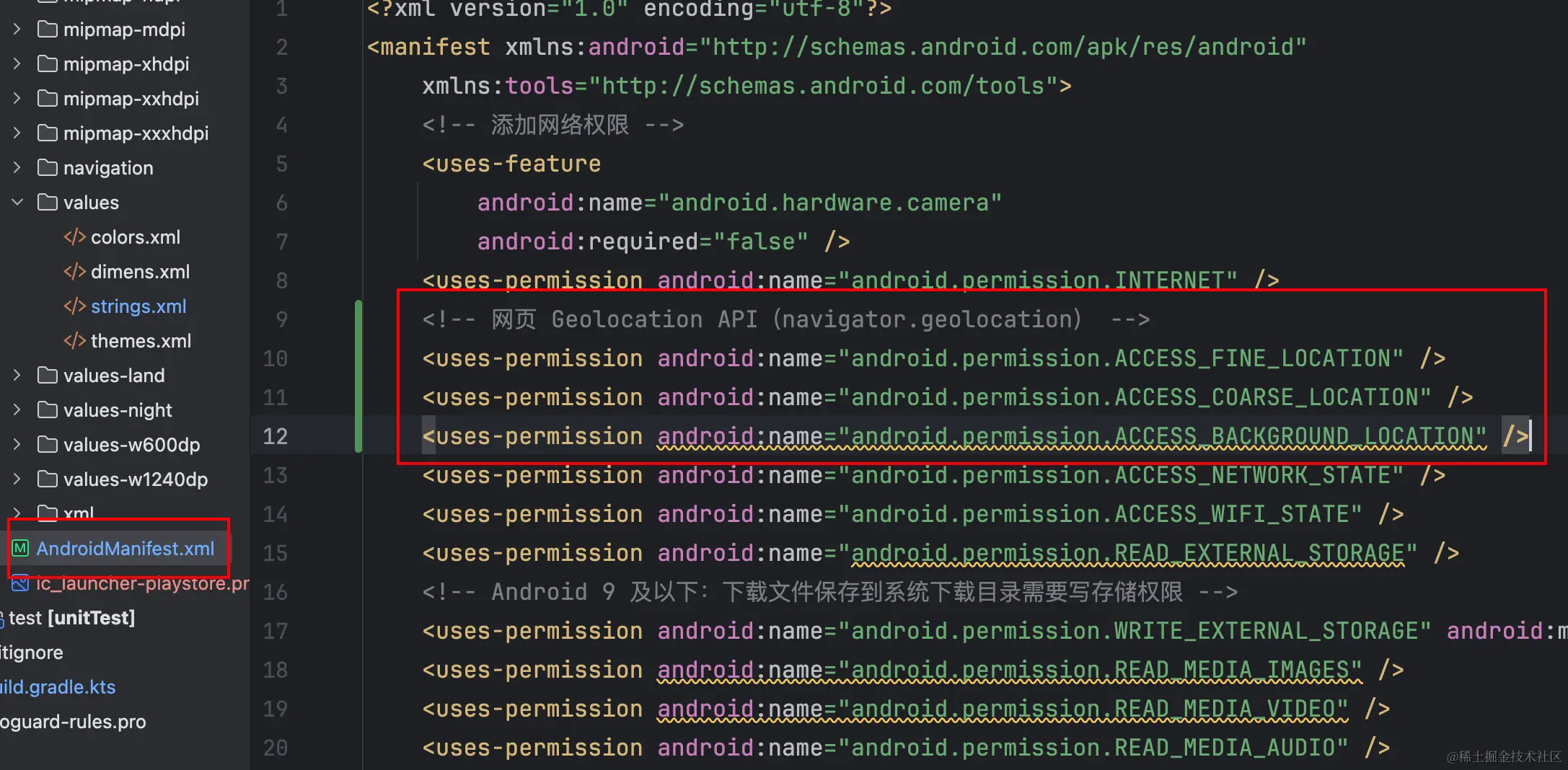
<!-- 网页 Geolocation API(navigator.geolocation) -->
    <uses-permission android:name="android.permission.ACCESS_FINE_LOCATION" />
    <uses-permission android:name="android.permission.ACCESS_COARSE_LOCATION" />
WebView 基础配置(Kotlin)
package com.app.pakeplus
import android.Manifest
import android.annotation.SuppressLint
import android.app.DownloadManager
import android.content.ActivityNotFoundException
import android.content.Context
import android.content.Intent
import android.content.pm.PackageManager
import android.graphics.Bitmap
import android.net.Uri
import android.os.Build
import android.os.Bundle
import android.os.Environment
import android.util.Log
import android.view.GestureDetector
import android.view.MotionEvent
import android.view.View
import android.view.ViewGroup
import android.view.WindowManager
import android.view.Gravity
import android.webkit.PermissionRequest
import android.webkit.JavascriptInterface
import android.webkit.URLUtil
import android.webkit.ValueCallback
import android.webkit.WebChromeClient
import android.webkit.WebResourceError
import android.webkit.WebResourceRequest
import android.webkit.WebResourceResponse
import android.webkit.GeolocationPermissions
import android.webkit.WebView
import android.webkit.WebViewClient
import android.webkit.MimeTypeMap
import android.widget.FrameLayout
import android.widget.Toast
import androidx.activity.enableEdgeToEdge
import androidx.activity.result.ActivityResultLauncher
import androidx.activity.result.contract.ActivityResultContracts
// import android.view.Menu
// import android.view.WindowInsets
// import com.google.android.material.snackbar.Snackbar
// import com.google.android.material.navigation.NavigationView
// import androidx.navigation.findNavController
// import androidx.navigation.ui.AppBarConfiguration
// import androidx.navigation.ui.navigateUp
// import androidx.navigation.ui.setupActionBarWithNavController
// import androidx.navigation.ui.setupWithNavController
// import androidx.drawerlayout.widget.DrawerLayout
// import com.app.pakeplus.databinding.ActivityMainBinding
import androidx.appcompat.app.AppCompatActivity
import androidx.core.content.ContextCompat
import androidx.core.net.toUri
import androidx.core.view.GestureDetectorCompat
import androidx.core.view.ViewCompat
import androidx.core.view.WindowInsetsCompat
import org.json.JSONObject
import java.net.URISyntaxException
import android.util.Base64
import java.io.File
import java.io.FileOutputStream
import kotlin.math.abs
class MainActivity : AppCompatActivity() {
// private lateinit var appBarConfiguration: AppBarConfiguration
// private lateinit var binding: ActivityMainBinding
private lateinit var webView: WebView
private lateinit var gestureDetector: GestureDetectorCompat
private var fileUploadCallback: ValueCallback<Array<Uri>>? = null
private lateinit var fileChooserLauncher: ActivityResultLauncher<Intent>
private lateinit var permissionLauncher: ActivityResultLauncher<Array<String>>
private var pendingPermissionRequest: PermissionRequest? = null
private lateinit var locationPermissionLauncher: ActivityResultLauncher<Array<String>>
private var pendingGeolocationOrigin: String? = null
private var pendingGeolocationCallback: GeolocationPermissions.Callback? = null
// 全屏视频相关
private var customView: View? = null
private var customViewCallback: WebChromeClient.CustomViewCallback? = null
private var originalOrientation: Int = 0
/** 是否从配置启用了全屏(隐藏状态栏+导航栏) */
private var isFullScreenMode: Boolean = false
/** 当前主文档是否已出现加载错误;仅成功时隐藏启动遮罩 */
private var mainFrameLoadError: Boolean = false
/** app.json 中 launch 非空时才显示启动图遮罩 */
private var showLaunchSplash: Boolean = false
@SuppressLint("SetJavaScriptEnabled", "ClickableViewAccessibility")
override fun onCreate(savedInstanceState: Bundle?) {
super.onCreate(savedInstanceState)
// 初始化文件选择器
fileChooserLauncher = registerForActivityResult(
ActivityResultContracts.StartActivityForResult()
) { result ->
val resultCode = result.resultCode
val data = result.data
if (fileUploadCallback == null) return@registerForActivityResult
var results: Array<Uri>? = null
if (resultCode == RESULT_OK && data != null) {
val dataString = data.dataString
val clipData = data.clipData
if (clipData != null) {
// 多文件选择
results = Array(clipData.itemCount) { i ->
clipData.getItemAt(i).uri
}
} else if (dataString != null) {
// 单文件选择
results = arrayOf(Uri.parse(dataString))
}
}
fileUploadCallback?.onReceiveValue(results)
fileUploadCallback = null
}
// 初始化运行时权限请求(摄像头 / 麦克风)
permissionLauncher = registerForActivityResult(
ActivityResultContracts.RequestMultiplePermissions()
) { permissions ->
val request = pendingPermissionRequest
if (request == null) {
return@registerForActivityResult
}
// 所有相关权限都通过才允许 WebView 使用
val allGranted = permissions.values.all { it }
if (allGranted) {
request.grant(request.resources)
} else {
request.deny()
}
pendingPermissionRequest = null
}
// 网页 HTML5 定位(navigator.geolocation)
locationPermissionLauncher = registerForActivityResult(
ActivityResultContracts.RequestMultiplePermissions()
) { results ->
val origin = pendingGeolocationOrigin
val geoCallback = pendingGeolocationCallback
pendingGeolocationOrigin = null
pendingGeolocationCallback = null
if (origin != null && geoCallback != null) {
val fine = results[Manifest.permission.ACCESS_FINE_LOCATION] == true
val coarse = results[Manifest.permission.ACCESS_COARSE_LOCATION] == true
geoCallback.invoke(origin, fine || coarse, false)
}
}
// parseJsonWithNative
val config = parseJsonWithNative(this, "app.json")
val fullScreen = config?.get("fullScreen") as? Boolean ?: false
val gesture = config?.get("gesture") as? Boolean ?: false
val debug = config?.get("debug") as? Boolean ?: false
val userAgent = config?.get("userAgent") as? String ?: ""
val webUrl = config?.get("webUrl") as? String ?: "https://pakeplus.com/"
val launchCfg = config?.get("launch") as? String
showLaunchSplash = !launchCfg.isNullOrBlank()
// enable debug by chrome://inspect
WebView.setWebContentsDebuggingEnabled(debug)
// config fullscreen
isFullScreenMode = fullScreen
if (fullScreen) {
window.setFlags(
WindowManager.LayoutParams.FLAG_FULLSCREEN,
WindowManager.LayoutParams.FLAG_FULLSCREEN,
)
window.setFlags(
WindowManager.LayoutParams.FLAG_TRANSLUCENT_NAVIGATION,
WindowManager.LayoutParams.FLAG_TRANSLUCENT_NAVIGATION
)
window.navigationBarColor = android.graphics.Color.TRANSPARENT
if (Build.VERSION.SDK_INT >= Build.VERSION_CODES.P) {
val lp = window.attributes
lp.layoutInDisplayCutoutMode =
WindowManager.LayoutParams.LAYOUT_IN_DISPLAY_CUTOUT_MODE_SHORT_EDGES
window.attributes = lp
}
// 低于 P 时在这里用旧 API 隐藏导航栏;P 及以上在 setContentView 后由 hideSystemUI() 统一处理
if (Build.VERSION.SDK_INT < Build.VERSION_CODES.P) {
@Suppress("DEPRECATION")
window.decorView.systemUiVisibility = (
View.SYSTEM_UI_FLAG_FULLSCREEN or
View.SYSTEM_UI_FLAG_HIDE_NAVIGATION or
View.SYSTEM_UI_FLAG_IMMERSIVE_STICKY or
View.SYSTEM_UI_FLAG_LAYOUT_FULLSCREEN or
View.SYSTEM_UI_FLAG_LAYOUT_HIDE_NAVIGATION or
View.SYSTEM_UI_FLAG_LAYOUT_STABLE
)
}
}
// 可以让内容视图的颜色延伸到屏幕边缘
enableEdgeToEdge()
setContentView(R.layout.single_main)
if (!showLaunchSplash) {
findViewById<View>(R.id.splash_overlay).visibility = View.GONE
}
// set system safe area
ViewCompat.setOnApplyWindowInsetsListener(findViewById(R.id.ConstraintLayout))
{ view, insets ->
val systemBar = insets.getInsets(WindowInsetsCompat.Type.systemBars())
view.setPadding(systemBar.left, systemBar.top, systemBar.right, systemBar.bottom)
insets
}
// 全屏模式下隐藏状态栏和底部导航栏(Android 9+ 必须在这里调用,window 已就绪)
if (isFullScreenMode) {
window.decorView.post { hideSystemUI() }
}
webView = findViewById<WebView>(R.id.webview)
webView.settings.apply {
javaScriptEnabled = true
domStorageEnabled = true
setGeolocationEnabled(true)
allowFileAccess = true
useWideViewPort = true
allowFileAccessFromFileURLs = true
allowContentAccess = true
allowUniversalAccessFromFileURLs = true
loadWithOverviewMode = true
mediaPlaybackRequiresUserGesture = false
// setSupportMultipleWindows(true)
}
webView
// set user agent
if (userAgent.isNotEmpty()) {
webView.settings.userAgentString = userAgent
}
webView.settings.loadWithOverviewMode = true
webView.settings.setSupportZoom(false)
// clear cache
webView.clearCache(true)
// 为 blob: 链接下载注入 JS 接口
webView.addJavascriptInterface(BlobDownloadInterface(this), "BlobDownloader")
// inject js
webView.webViewClient = MyWebViewClient(debug)
// get web load progress
webView.webChromeClient = MyChromeClient(this)
// 网页内下载:点击下载链接时由 DownloadManager 保存到系统下载目录
webView.setDownloadListener { url, userAgent, contentDisposition, mimetype, contentLength ->
startDownload(url, userAgent, contentDisposition, mimetype)
}
// Setup gesture detector
gestureDetector =
GestureDetectorCompat(this, object : GestureDetector.SimpleOnGestureListener() {
override fun onFling(
e1: MotionEvent?,
e2: MotionEvent,
velocityX: Float,
velocityY: Float
): Boolean {
if (e1 == null) return false
val diffX = e2.x - e1.x
val diffY = e2.y - e1.y
// Only handle horizontal swipes
if (abs(diffX) > abs(diffY)) {
if (abs(diffX) > 100 && abs(velocityX) > 100) {
if (diffX > 0) {
// Swipe right - go back
if (webView.canGoBack()) {
webView.goBack()
return true
}
} else {
// Swipe left - go forward
if (webView.canGoForward()) {
webView.goForward()
return true
}
}
}
}
return false
}
})
// Set touch listener for WebView
webView.setOnTouchListener { _, event ->
if (gesture) {
gestureDetector.onTouchEvent(event)
}
false
}
// load webUrl or file:///android_asset/index.html
webView.loadUrl(webUrl)
// binding = ActivityMainBinding.inflate(layoutInflater)
// setContentView(R.layout.single_main)
// setSupportActionBar(binding.appBarMain.toolbar)
// binding.appBarMain.fab.setOnClickListener { view ->
// Snackbar.make(view, "Replace with your own action", Snackbar.LENGTH_LONG)
// .setAction("Action", null)
// .setAnchorView(R.id.fab).show()
// }
// val drawerLayout: DrawerLayout = binding.drawerLayout
// val navView: NavigationView = binding.navView
// val navController = findNavController(R.id.nav_host_fragment_content_main)
// Passing each menu ID as a set of Ids because each
// menu should be considered as top level destinations.
// appBarConfiguration = AppBarConfiguration(
// setOf(
// R.id.nav_home, R.id.nav_gallery, R.id.nav_slideshow
// ), drawerLayout
// )
// setupActionBarWithNavController(navController, appBarConfiguration)
// navView.setupWithNavController(navController)
}
override fun onPause() {
super.onPause()
webView.onPause()
// 如果正在全屏播放视频,暂停播放
if (customView != null) {
webView.pauseTimers()
}
}
override fun onResume() {
super.onResume()
webView.onResume()
// 恢复 WebView 的定时器
webView.resumeTimers()
}
override fun onWindowFocusChanged(hasFocus: Boolean) {
super.onWindowFocusChanged(hasFocus)
// 全屏模式下窗口重新获得焦点时再次隐藏导航栏(用户从边缘滑出后会自动再隐藏)
if (hasFocus && isFullScreenMode && customView == null) {
hideSystemUI()
}
}
override fun onDestroy() {
// 清理全屏视图
if (customView != null) {
hideCustomView()
}
webView.destroy()
super.onDestroy()
}
@Deprecated("Deprecated in Java")
override fun onBackPressed() {
// 如果正在全屏播放视频,先退出全屏
if (customView != null) {
hideCustomView()
return
}
if (webView.canGoBack()) {
webView.goBack()
} else {
super.onBackPressed()
}
}
// 显示全屏视频
private fun showCustomView(view: View, callback: WebChromeClient.CustomViewCallback) {
// 如果已经有全屏视图,先隐藏它
if (customView != null) {
hideCustomView()
return
}
customView = view
customViewCallback = callback
// 保存当前屏幕方向
originalOrientation = requestedOrientation
// 获取根布局
val decorView = window.decorView as ViewGroup
val rootView = decorView.findViewById<ViewGroup>(android.R.id.content)
// 创建全屏容器
val fullscreenContainer = FrameLayout(this).apply {
layoutParams = ViewGroup.LayoutParams(
ViewGroup.LayoutParams.MATCH_PARENT,
ViewGroup.LayoutParams.MATCH_PARENT
)
setBackgroundColor(android.graphics.Color.BLACK)
}
// 将全屏视图添加到容器
fullscreenContainer.addView(view)
// 将容器添加到根布局
rootView.addView(fullscreenContainer)
// 隐藏系统UI
hideSystemUI()
// 隐藏WebView
webView.visibility = View.GONE
}
// 隐藏全屏视频
private fun hideCustomView() {
if (customView == null) return
// 恢复系统UI
showSystemUI()
// 显示WebView
webView.visibility = View.VISIBLE
// 获取根布局
val decorView = window.decorView as ViewGroup
val rootView = decorView.findViewById<ViewGroup>(android.R.id.content)
// 移除全屏容器
val fullscreenContainer = customView?.parent as? ViewGroup
fullscreenContainer?.let {
rootView.removeView(it)
}
// 调用回调
customViewCallback?.onCustomViewHidden()
// 清理
customView = null
customViewCallback = null
// 恢复屏幕方向
requestedOrientation = originalOrientation
}
// 隐藏系统UI(全屏模式)
private fun hideSystemUI() {
if (Build.VERSION.SDK_INT >= Build.VERSION_CODES.R) {
window.insetsController?.let {
it.hide(android.view.WindowInsets.Type.systemBars())
// 设置系统栏行为:通过滑动显示临时栏
try {
@Suppress("NewApi")
it.systemBarsBehavior =
android.view.WindowInsetsController.BEHAVIOR_SHOW_TRANSIENT_BARS_BY_SWIPE
} catch (e: Exception) {
// 如果常量不可用,忽略此设置
Log.w("MainActivity", "BEHAVIOR_SHOW_TRANSIENT_BARS_BY_SWIPE not available", e)
}
}
} else {
@Suppress("DEPRECATION")
window.decorView.systemUiVisibility = (
View.SYSTEM_UI_FLAG_FULLSCREEN
or View.SYSTEM_UI_FLAG_HIDE_NAVIGATION
or View.SYSTEM_UI_FLAG_IMMERSIVE_STICKY
or View.SYSTEM_UI_FLAG_LAYOUT_STABLE
or View.SYSTEM_UI_FLAG_LAYOUT_HIDE_NAVIGATION
or View.SYSTEM_UI_FLAG_LAYOUT_FULLSCREEN
)
}
}
// 显示系统UI
private fun showSystemUI() {
if (Build.VERSION.SDK_INT >= Build.VERSION_CODES.R) {
window.insetsController?.show(android.view.WindowInsets.Type.systemBars())
} else {
@Suppress("DEPRECATION")
window.decorView.systemUiVisibility = View.SYSTEM_UI_FLAG_VISIBLE
}
}
fun parseJsonWithNative(context: Context, jsonFilePath: String): Map<String, Any>? {
val jsonString = assets.open(jsonFilePath).bufferedReader().use { it.readText() }
return try {
val jsonObject = JSONObject(jsonString)
// 提取字段
val name = jsonObject.getString("name")
val webUrl = jsonObject.getString("webUrl")
val debug = jsonObject.getBoolean("debug")
val userAgent = jsonObject.getString("userAgent")
val fullScreen = jsonObject.getBoolean("fullScreen")
val launch = jsonObject.getString("launch")
// 返回键值对
mapOf(
"name" to name,
"webUrl" to webUrl,
"debug" to debug,
"userAgent" to userAgent,
"fullScreen" to fullScreen,
"launch" to launch
)
} catch (e: Exception) {
e.printStackTrace()
null
}
}
/**
* JS 调用的接口:接收 base64 数据并保存为文件
*/
inner class BlobDownloadInterface(private val context: Context) {
@JavascriptInterface
fun downloadBase64File(base64Data: String, mimeType: String?, fileName: String?) {
try {
val bytes = Base64.decode(base64Data, Base64.DEFAULT)
// 统一保存到系统 Download 目录,和普通下载保持一致
val downloadsDir =
Environment.getExternalStoragePublicDirectory(Environment.DIRECTORY_DOWNLOADS)
if (!downloadsDir.exists()) {
downloadsDir.mkdirs()
}
val safeName = when {
!fileName.isNullOrBlank() -> fileName
!mimeType.isNullOrBlank() -> {
val ext = MimeTypeMap.getSingleton()
.getExtensionFromMimeType(mimeType) ?: "bin"
"download_${System.currentTimeMillis()}.$ext"
}
else -> "download_${System.currentTimeMillis()}.bin"
}
val outFile = File(downloadsDir, safeName)
FileOutputStream(outFile).use { it.write(bytes) }
showTopToast(context, "已保存到下载目录: ${outFile.name}", Toast.LENGTH_LONG)
Log.d("BlobDownload", "File saved: ${outFile.absolutePath}")
} catch (e: Exception) {
Log.e("BlobDownload", "save error", e)
showTopToast(context, "保存失败: ${e.message}", Toast.LENGTH_LONG)
}
}
}
/**
* 根据 URL / Content-Disposition / MIME 开始一个系统下载任务
* - 对常见的 mp4 纠正被识别成 .bin 的问题
* - 供 WebView DownloadListener 和 shouldOverrideUrlLoading 共用
*/
private fun startDownload(
url: String,
userAgent: String?,
contentDisposition: String?,
mimetype: String?
) {
// 1. 先根据 URL / Content-Disposition / MIME 推测文件名
var fileName = URLUtil.guessFileName(url, contentDisposition, mimetype)
// 2. 处理 mp4 被识别成 .bin 的场景
val lowerMime = mimetype?.lowercase() ?: ""
val lowerName = fileName.lowercase()
val isVideoMp4 = lowerMime.contains("video/mp4") ||
(lowerMime.contains("application/octet-stream") && url.contains(
".mp4",
ignoreCase = true
))
if (isVideoMp4) {
fileName = when {
lowerName.endsWith(".mp4") -> fileName
lowerName.endsWith(".bin") -> fileName.replace(
Regex(
"\\.bin$",
RegexOption.IGNORE_CASE
), ".mp4"
)
!fileName.contains('.') -> "$fileName.mp4"
else -> fileName
}
}
val request = DownloadManager.Request(Uri.parse(url)).apply {
// 对于 mp4 强制使用正确的 MIME,避免部分 ROM 再次误判
if (isVideoMp4) {
setMimeType("video/mp4")
} else if (!mimetype.isNullOrEmpty()) {
setMimeType(mimetype)
}
if (!userAgent.isNullOrEmpty()) {
addRequestHeader("User-Agent", userAgent)
}
setDescription(getString(R.string.downloading))
setTitle(fileName)
setNotificationVisibility(DownloadManager.Request.VISIBILITY_VISIBLE_NOTIFY_COMPLETED)
setDestinationInExternalPublicDir(Environment.DIRECTORY_DOWNLOADS, fileName)
}
val dm = getSystemService(Context.DOWNLOAD_SERVICE) as DownloadManager
dm.enqueue(request)
showTopToast(this, getString(R.string.download_started), Toast.LENGTH_SHORT)
}
/**
* 将 Toast 显示在屏幕顶部
*/
private fun showTopToast(context: Context, message: String, duration: Int) {
val toast = Toast.makeText(context, message, duration)
toast.setGravity(Gravity.TOP or Gravity.CENTER_HORIZONTAL, 0, 120)
toast.show()
}
/**
* 判断一个 URL 是否是“常见文件类型”,用于自动触发下载
*/
private fun isDownloadableFileUrl(url: String): Boolean {
val checkUrl = url.substringBefore("?").substringBefore("#").lowercase()
// 可按需要继续扩展
val exts = listOf(
"mp4", "mov", "mkv", "avi",
"mp3", "aac", "wav", "flac",
"jpg", "jpeg", "png", "gif", "webp", "bmp",
"txt", "pdf",
"doc", "docx", "xls", "xlsx", "ppt", "pptx",
"zip", "rar", "7z"
)
return exts.any { checkUrl.endsWith(".$it") }
}
// override fun onCreateOptionsMenu(menu: Menu): Boolean {
// // Inflate the menu; this adds items to the action bar if it is present.
// menuInflater.inflate(R.menu.main, menu)
// return true
// }
// override fun onSupportNavigateUp(): Boolean {
// val navController = findNavController(R.id.nav_host_fragment_content_main)
// return navController.navigateUp(appBarConfiguration) || super.onSupportNavigateUp()
// }
private fun hideSplashOverlay() {
if (!showLaunchSplash) return
val overlay = findViewById<View>(R.id.splash_overlay)
if (overlay.visibility != View.VISIBLE) return
overlay.animate()
.alpha(0f)
.setDuration(200L)
.withEndAction {
overlay.visibility = View.GONE
overlay.alpha = 1f
}
.start()
}
inner class MyWebViewClient(val debug: Boolean) : WebViewClient() {
@Deprecated("Deprecated in Java", ReplaceWith("false"))
override fun shouldOverrideUrlLoading(view: WebView?, url: String?): Boolean {
if (url == null) return false
val fixedUrl = url.toString()
// 对常见文件类型的 HTTP/HTTPS 链接,直接拦截为下载,不在 WebView 内打开
if (fixedUrl.startsWith("http://") || fixedUrl.startsWith("https://")) {
if (isDownloadableFileUrl(fixedUrl)) {
val ua = view?.settings?.userAgentString ?: ""
// 根据扩展名推断 MIME
val ext = MimeTypeMap.getFileExtensionFromUrl(fixedUrl)
val mime = ext?.let {
MimeTypeMap.getSingleton().getMimeTypeFromExtension(it.lowercase())
}
?: "application/octet-stream"
this@MainActivity.startDownload(fixedUrl, ua, null, mime)
return true
}
// 普通网页,交给 WebView 处理
return false
}
// file:// 链接仍交给 WebView 处理
if (fixedUrl.startsWith("file://")) {
return false
}
// --- 处理外部应用链接 ---
// 1. 检查是否是 Intent URI (e.g., intent://...)
if (fixedUrl.startsWith("intent://")) {
try {
// 解析 Intent URI
val intent = Intent.parseUri(fixedUrl, Intent.URI_INTENT_SCHEME)
// 检查设备上是否有应用可以处理此 Intent
if (intent.resolveActivity(view?.context?.packageManager!!) != null) {
view.context?.startActivity(intent)
return true // 已经处理,阻止 WebView 加载
}
// 如果找不到能处理的应用,可以尝试打开备用 URL (如果 Intent 中有定义 fallback URL)
val fallbackUrl = intent.getStringExtra("browser_fallback_url")
if (!fallbackUrl.isNullOrEmpty()) {
view.loadUrl(fallbackUrl)
return true // 加载备用 URL
}
} catch (e: URISyntaxException) {
// 解析 Intent URI 失败
Log.e("WebViewClient", "Bad Intent URI: $fixedUrl", e)
} catch (e: ActivityNotFoundException) {
// 找不到匹配的 Activity (外部应用未安装),此情况通常在 `resolveActivity` 后捕获
Log.e("WebViewClient", "No activity found to handle Intent: $fixedUrl", e)
// 您也可以在这里加载一个 "未安装应用" 的提示页面
}
// 如果是 Intent 但无法处理(例如未安装应用),您可以选择返回 false 让 WebView 尝试加载(通常会失败)
// 或者继续执行下面的 Scheme 检查
}
// 3. 检查是否是其他自定义 Scheme (e.g., weixin://, zhihu://)
// 注意:Intent URI 是更通用和推荐的方式,但有些应用可能直接使用 Scheme。
try {
val intent = Intent(Intent.ACTION_VIEW, fixedUrl.toUri())
// 必须检查是否有应用可以处理此 Intent,否则会导致崩溃
if (intent.resolveActivity(view?.context?.packageManager!!) != null) {
view.context?.startActivity(intent)
return true // 已经处理,阻止 WebView 加载
} else {
// 没有安装相应的应用
Log.w("WebViewClient", "External app not installed for: $fixedUrl")
// 可以添加逻辑提示用户下载应用或打开相应的应用商店链接
}
} catch (e: Exception) {
Log.e("WebViewClient", "Error starting external app: $fixedUrl", e)
}
// 如果不是外部应用 Scheme,也不是 HTTP/HTTPS,则返回 false,让 WebView 处理
return false
}
override fun doUpdateVisitedHistory(view: WebView?, url: String?, isReload: Boolean) {
super.doUpdateVisitedHistory(view, url, isReload)
}
override fun onReceivedError(
view: WebView?,
request: WebResourceRequest?,
error: WebResourceError?
) {
super.onReceivedError(view, request, error)
println("webView onReceivedError: ${error?.description}")
if (showLaunchSplash && request?.isForMainFrame == true) {
mainFrameLoadError = true
}
}
override fun onReceivedHttpError(
view: WebView?,
request: WebResourceRequest?,
errorResponse: WebResourceResponse?
) {
super.onReceivedHttpError(view, request, errorResponse)
if (showLaunchSplash && request?.isForMainFrame == true) {
val code = errorResponse?.statusCode ?: 0
if (code >= 400) mainFrameLoadError = true
}
}
override fun onPageFinished(view: WebView?, url: String?) {
super.onPageFinished(view, url)
// post 一次,尽量避免与 onReceivedError / onReceivedHttpError 的时序竞态
view?.post {
if (!mainFrameLoadError) hideSplashOverlay()
}
// 注入脚本,拦截 blob: 链接并通过 BlobDownloader 保存到本地
val blobInterceptor = """
(function () {
if (window.__blobDownloadInjected) return;
window.__blobDownloadInjected = true;
document.addEventListener('click', function (e) {
try {
var target = e.target;
// 寻找最近的 <a> 标签
while (target && target.tagName && target.tagName.toLowerCase() !== 'a') {
target = target.parentElement;
}
if (!target) return;
var href = target.getAttribute('href');
if (!href || href.indexOf('blob:') !== 0) return;
// 拦截浏览器默认行为
e.preventDefault();
e.stopPropagation();
var fileName = target.getAttribute('download') || 'download-' + Date.now();
// 通过 fetch 拿到 blob,再转 base64 交给原生
fetch(href)
.then(function (res) { return res.blob(); })
.then(function (blob) {
var reader = new FileReader();
reader.onloadend = function () {
try {
var dataUrl = reader.result || '';
var commaIndex = dataUrl.indexOf(',');
var base64 = commaIndex >= 0 ? dataUrl.substring(commaIndex + 1) : dataUrl;
var mime = blob.type || 'application/octet-stream';
if (window.BlobDownloader && window.BlobDownloader.downloadBase64File) {
window.BlobDownloader.downloadBase64File(base64, mime, fileName);
} else {
console.error('BlobDownloader not found on window');
}
} catch (err) {
console.error('Blob download convert error', err);
}
};
reader.readAsDataURL(blob);
})
.catch(function (err) {
console.error('Blob download fetch error', err);
});
} catch (e2) {
console.error('Blob download interceptor error', e2);
}
}, true);
})();
""".trimIndent()
view?.evaluateJavascript(blobInterceptor, null)
}
override fun onPageStarted(view: WebView?, url: String?, favicon: Bitmap?) {
super.onPageStarted(view, url, favicon)
if (showLaunchSplash) mainFrameLoadError = false
if (debug) {
// vConsole
val vConsole = assets.open("vConsole.js").bufferedReader().use { it.readText() }
val openDebug = """var vConsole = new window.VConsole()"""
view?.evaluateJavascript(vConsole + openDebug, null)
}
// inject js
val injectJs = assets.open("custom.js").bufferedReader().use { it.readText() }
view?.evaluateJavascript(injectJs, null)
}
}
inner class MyChromeClient(private val activity: MainActivity) : WebChromeClient() {
override fun onProgressChanged(view: WebView?, newProgress: Int) {
super.onProgressChanged(view, newProgress)
val url = view?.url
println("wev view url:$url")
}
// 处理 getUserMedia 权限请求(摄像头 / 麦克风)
override fun onPermissionRequest(request: PermissionRequest?) {
if (request == null) return
activity.runOnUiThread {
val resources = request.resources
// 需要对应的原生权限
val needPermissions = mutableListOf<String>()
if (resources.contains(PermissionRequest.RESOURCE_VIDEO_CAPTURE)) {
needPermissions.add(Manifest.permission.CAMERA)
}
if (resources.contains(PermissionRequest.RESOURCE_AUDIO_CAPTURE)) {
needPermissions.add(Manifest.permission.RECORD_AUDIO)
}
if (needPermissions.isEmpty()) {
// 不涉及摄像头/麦克风,直接允许
request.grant(resources)
return@runOnUiThread
}
// 检查是否已经有原生权限
val notGranted = needPermissions.filter {
ContextCompat.checkSelfPermission(
activity,
it
) != PackageManager.PERMISSION_GRANTED
}
if (notGranted.isEmpty()) {
// 已经有权限,直接授予给 WebView
request.grant(resources)
} else {
// 先请求原生权限,保存 WebView 的请求
activity.pendingPermissionRequest?.deny()
activity.pendingPermissionRequest = request
activity.permissionLauncher.launch(notGranted.toTypedArray())
}
}
}
override fun onPermissionRequestCanceled(request: PermissionRequest?) {
super.onPermissionRequestCanceled(request)
if (activity.pendingPermissionRequest == request) {
activity.pendingPermissionRequest = null
}
}
override fun onGeolocationPermissionsShowPrompt(
origin: String?,
callback: GeolocationPermissions.Callback?
) {
if (origin == null || callback == null) {
super.onGeolocationPermissionsShowPrompt(origin, callback)
return
}
activity.runOnUiThread {
val fineOk = ContextCompat.checkSelfPermission(
activity,
Manifest.permission.ACCESS_FINE_LOCATION
) == PackageManager.PERMISSION_GRANTED
val coarseOk = ContextCompat.checkSelfPermission(
activity,
Manifest.permission.ACCESS_COARSE_LOCATION
) == PackageManager.PERMISSION_GRANTED
if (fineOk || coarseOk) {
callback.invoke(origin, true, false)
return@runOnUiThread
}
val need = buildList {
if (!fineOk) add(Manifest.permission.ACCESS_FINE_LOCATION)
if (!coarseOk) add(Manifest.permission.ACCESS_COARSE_LOCATION)
}.toTypedArray()
activity.pendingGeolocationCallback?.let { prevCb ->
activity.pendingGeolocationOrigin?.let { prevOrigin ->
prevCb.invoke(prevOrigin, false, false)
}
}
activity.pendingGeolocationOrigin = origin
activity.pendingGeolocationCallback = callback
activity.locationPermissionLauncher.launch(need)
}
}
override fun onShowCustomView(view: View?, callback: CustomViewCallback?) {
if (view != null && callback != null) {
activity.showCustomView(view, callback)
} else {
super.onShowCustomView(view, callback)
}
}
override fun onHideCustomView() {
activity.hideCustomView()
super.onHideCustomView()
}
// 处理文件选择(Android 5.0+)
override fun onShowFileChooser(
webView: WebView?,
filePathCallback: ValueCallback<Array<Uri>>?,
fileChooserParams: FileChooserParams?
): Boolean {
// 如果之前有未完成的回调,取消它
if (activity.fileUploadCallback != null) {
activity.fileUploadCallback?.onReceiveValue(null)
}
activity.fileUploadCallback = filePathCallback
try {
val intent = Intent(Intent.ACTION_GET_CONTENT).apply {
addCategory(Intent.CATEGORY_OPENABLE)
// 根据参数设置文件类型
val acceptTypes = fileChooserParams?.acceptTypes
if (acceptTypes != null && acceptTypes.isNotEmpty()) {
// 支持多种 MIME 类型
if (acceptTypes.size == 1) {
type = acceptTypes[0]
} else {
// 多个类型时使用通配符,并设置额外类型
type = "*/*"
putExtra(Intent.EXTRA_MIME_TYPES, acceptTypes)
}
} else {
// 默认支持所有文件类型
type = "*/*"
}
// 支持多选
if (fileChooserParams?.mode == FileChooserParams.MODE_OPEN_MULTIPLE) {
putExtra(Intent.EXTRA_ALLOW_MULTIPLE, true)
}
}
// 创建选择器,允许用户选择不同的应用来打开文件
val chooserIntent = Intent.createChooser(intent, "选择文件")
activity.fileChooserLauncher.launch(chooserIntent)
return true
} catch (e: ActivityNotFoundException) {
Log.e("WebChromeClient", "无法打开文件选择器", e)
activity.fileUploadCallback?.onReceiveValue(null)
activity.fileUploadCallback = null
return false
}
}
}
}
前端 H5 测试代码
<!DOCTYPE html>
<html>
<body>
    <h1>WebView 定位测试</h1>
    <p id="location"></p>

    <script>
        function getLocation() {
            if (navigator.geolocation) {
                navigator.geolocation.getCurrentPosition(
                    (position) => {
                        const lat = position.coords.latitude;
                        const lng = position.coords.longitude;
                        document.getElementById("location").innerText =
                            `纬度: ${lat}\n经度: ${lng}`;
                    },
                    (error) => {
                        document.getElementById("location").innerText =
                            `错误: ${error.message}`;
                    }
                );
            } else {
                document.getElementById("location").innerText = "浏览器不支持定位";
            }
        }
        // 页面加载后获取定位
        window.onload = getLocation;
    </script>
</body>
</html>
常见问题与注意事项
-
Android 7.0+ 安全限制
<ul>
<li>定位只在 <strong>HTTPS</strong> 页面有效(<code>onGeolocationPermissionsShowPrompt</code> 仅对 HTTPS 调用)</li>
<li>测试可用 <code>android:usesCleartextTraffic="true"</code>(仅开发环境)</li>
</ul>
</li>
<li>
<p><strong>权限回调不触发</strong></p>
<ul>
<li>必须同时配置:<code>setGeolocationEnabled(true)</code> + <code>WebChromeClient</code></li>
<li>必须先拿到<strong>系统定位权限</strong>,Web 层权限才会生效</li>
</ul>
</li>
<li>
<p><strong>定位不准 / 失败</strong></p>
<ul>
<li>开启 <code>ACCESS_FINE_LOCATION</code>(GPS)</li>
<li>确保设备已开启「定位服务」</li>
<li>室外 / 开阔环境测试</li>
</ul>
</li>
<li>
<p><strong>Android 12+ 后台定位</strong></p>
<ul>
<li>如需后台定位,额外申请 <code>ACCESS_BACKGROUND_LOCATION</code></li>
<li>需在系统设置中手动授权「始终允许」</li>
</ul>
</li>

 登录
登录