公司目前做的是一款激光雕刻产品,主要用于出口海外,需要开发一个web社区网站用于桌面端模型生成后发布到社区进行分享和交流。说到出海产品,google第三方登录是必须接入的,这两天和后端一起开发完成了此功能,现将流程大概梳理如下。
首先当然是看Google的OAuth 2.0文档,了解其流程和参数。
文档地址:developers.google.com/identity/pr…
第一步:在Google API Console创建 OAuth 2.0 凭据

第二步:接入方式和流程
我们可以看到文档提供了多种应用类型的接入方式,对于web来说主要是红框里的两种。
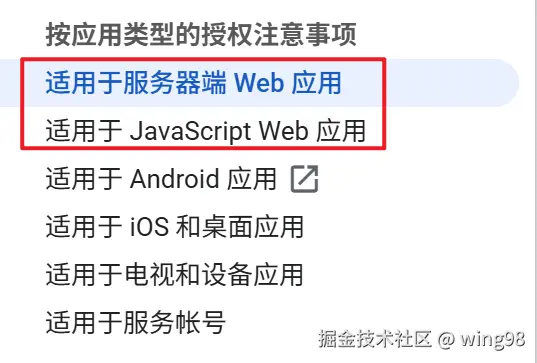
1、适用于服务器端 Web 应用
我们目前采用的方式,需要后端存储google用户信息。
接入流程:前端唤起 Google 授权 → 前端获取授权码 → 后端用授权码换 token → 验证用户信息并返回自有 token
2、适用于 JavaScript Web 应用
主要前端完成google登录,后端只需要接收前端返回的token进行验证即可。
接入流程:用户点击登录 → 授权 -> 前端直接获得id_token + 用户信息 -> id_token 发给后端验证 → 完成登录。
另外对于前端交互来说均有两种可供选择:
1、popup模式:在当前页面弹窗授权,体验更友好。
2、redirect模式:跳转新页面授权后重定向回来。
popup模式,采用vue3-google-login第三方依赖。需要注意的点:
1、前端测试通过code换取access_token时,postman需要设置请求头“Content-Type: application/x-www-form-urlencoded”,否则会报错“invalid_grant”。
2、Google凭据那里不需要配置重定向URI,且后端用code换取access_token所传的参数redirect_uri应该为“postmessage”,否则会报错“redirect_uri_mismatch”。
3、code不能重复使用。
以下是直接可用的前端代码(popup模式):
GoogleLoginBtn.vue
<template> <GoogleLogin :client-id="googleClientId" popup-type="CODE" :callback="handleGoogleSuccess" :error="handleGoogleError" > <img class="google-login-icon" src="@/assets/icons/google.png" alt="google-login"> <button v-if="false" class="google-login-button" type="button"> <span class="google-mark">G</span> <span class="google-label">{{ buttonLabel }}</span> </button> </GoogleLogin></template><script setup lang="ts">import { ElMessage } from 'element-plus'import { GoogleLogin, type CallbackTypes } from 'vue3-google-login'import { useUserStore } from '@/stores/user'interface Props { buttonLabel?: string}interface Emits { (e: 'success'): void (e: 'error'): void}withDefaults(defineProps<Props>(), { buttonLabel: 'Google 账号快捷登录',})const emit = defineEmits<Emits>()const userStore = useUserStore()const googleClientId = import.meta.env.VITE_GOOGLE_CLIENT_ID as string | undefinedconst handleGoogleSuccess = async (response: CallbackTypes.CodePopupResponse) => { if (!response?.code) { ElMessage.error('未获取到 Google 授权码') emit('error') return } const success = await userStore.userLoginByGoogleCode(response.code) if (success) { emit('success') return } emit('error')}const handleGoogleError = (_error: unknown) => { ElMessage.error('Google 授权失败,请重试') emit('error')}</script><style scoped lang="scss">.google-login-button { width: 176px; height: 44px; border: 1px solid #d9d9d9; border-radius: 10px; background: #fff; display: flex; align-items: center; justify-content: center; gap: 8px; cursor: pointer; transition: all 0.2s ease;}.google-login-button:hover { border-color: #c7c7c7; box-shadow: 0 4px 12px rgba(0, 0, 0, 0.12); transform: translateY(-1px);}.google-mark { font-size: 18px; font-weight: 700; color: #ea4335;}.google-label { font-size: 13px; color: #333; white-space: nowrap;}.google-login-icon { width: 48px; height: 48px; cursor: pointer;}</style>
redirect模式,期间由于踩了上面提的popup模式的坑,也改过一版redirect模式,没有采用第三方依赖。
以下是直接可用的前端代码(redirect模式):
GoogleLoginBtn.vue
<template> <button class="google-login-trigger" type="button" @click="handleGoogleLogin"> <img class="google-login-icon" src="@/assets/icons/google.png" alt="google-login" /> <span class="sr-only">{{ buttonLabel }}</span> </button></template><script setup lang="ts">import { ElMessage } from 'element-plus'interface Props { buttonLabel?: string}interface Emits { (e: 'success'): void (e: 'error'): void}withDefaults(defineProps<Props>(), { buttonLabel: 'Google 账号快捷登录',})const emit = defineEmits<Emits>()const GOOGLE_STATE_KEY = 'google_oauth_state'const googleClientId = import.meta.env.VITE_GOOGLE_CLIENT_ID as string | undefinedconst googleRedirectUri = (import.meta.env.VITE_GOOGLE_REDIRECT_URI as string | undefined) || `${window.location.origin}/front/community/home`const createOAuthState = () => { if (window.crypto?.randomUUID) { return window.crypto.randomUUID() } return `${Date.now()}_${Math.random().toString(36).slice(2)}`}const handleGoogleLogin = () => { if (!googleClientId) { ElMessage.error('未配置 Google Client ID,无法登录') emit('error') return } const state = createOAuthState() sessionStorage.setItem(GOOGLE_STATE_KEY, state) const query = new URLSearchParams({ client_id: googleClientId, redirect_uri: googleRedirectUri, response_type: 'code', scope: 'openid profile email', state, }) window.location.assign(`https://accounts.google.com/o/oauth2/v2/auth?${query.toString()}`)}</script><style scoped lang="scss">.google-login-trigger { display: inline-flex; align-items: center; justify-content: center; border: none; background: transparent; padding: 0; cursor: pointer;}.google-login-icon { width: 48px; height: 48px; cursor: pointer;}.sr-only { position: absolute; width: 1px; height: 1px; padding: 0; margin: -1px; overflow: hidden; clip: rect(0, 0, 0, 0); white-space: nowrap; border: 0;}</style>
App.vue
<template> <Layout :show-top-bar="showTopBar"> <router-view /> </Layout></template><script setup lang="ts">import Layout from './components/Layout.vue'import { useRoute, useRouter } from 'vue-router'import { computed, onMounted, nextTick, ref, watch } from 'vue'import { useI18n } from 'vue-i18n'import { ElMessage } from 'element-plus'import { useUserStore } from '@/stores/user'const route = useRoute()const router = useRouter()const userStore = useUserStore()const { t } = useI18n()const isProcessingGoogleOAuth = ref(false)const GOOGLE_STATE_KEY = 'google_oauth_state'const showTopBar = computed(() => { const from = route.query.from as string localStorage.setItem('from', from || 'community') return from !== 'pc-home'})const getSingleQueryValue = (value: unknown) => { if (Array.isArray(value)) { return value[0] || '' } return typeof value === 'string' ? value : ''}const clearGoogleOAuthQuery = async () => { const nextQuery = { ...route.query } delete nextQuery.code delete nextQuery.scope delete nextQuery.authuser delete nextQuery.prompt delete nextQuery.state delete nextQuery.error delete nextQuery.error_description await router.replace({ path: route.path, query: nextQuery, })}const processGoogleOAuthCallback = async () => { const code = getSingleQueryValue(route.query.code) const oauthError = getSingleQueryValue(route.query.error) const incomingState = getSingleQueryValue(route.query.state) if ((!code && !oauthError) || isProcessingGoogleOAuth.value) { return } isProcessingGoogleOAuth.value = true try { if (oauthError) { ElMessage.error(`Google OAuth failed: ${oauthError}`) return } const expectedState = sessionStorage.getItem(GOOGLE_STATE_KEY) sessionStorage.removeItem(GOOGLE_STATE_KEY) if (expectedState && expectedState !== incomingState) { ElMessage.error('Google OAuth state validation failed') return } const success = await userStore.userLoginByGoogleCode(code) if (success) { ElMessage.success(t('auth.loginSuccess')) } } finally { await clearGoogleOAuthQuery() isProcessingGoogleOAuth.value = false }}watch( () => route.fullPath, () => { void processGoogleOAuthCallback() }, { immediate: true })onMounted(async () => { await nextTick() const from = route.query.from as string console.log('route.query.from:', from)})</script><style scoped>* { margin: 0; padding: 0; box-sizing: border-box;}body { font-family: 'Segoe UI', Roboto, 'Helvetica Neue', Arial, sans-serif; line-height: 1.5; color: #333; background-color: #f5f5f5;}.content-placeholder { text-align: center; padding: 60px 20px; color: #666;}.content-placeholder h1 { font-size: 36px; margin-bottom: 20px; color: #333;}</style>

 登录
登录