阅读视图

发现新文章,点击刷新页面。

揭秘春晚“两个蔡明”背后,这家机器人公司的百日奋战

文|邱晓芬

编辑|苏建勋

2026年马年央视春晚,当著名表演艺术家蔡明在小品《奶奶的最爱》中,缓缓推出一台和她一模一样的机器人时,中年观众集体梦回30年前的春晚小品《机器人趣话》。

△1996年,蔡明和郭达在春晚上演小品《机器人趣话》,蔡明自己扮演被送上门的“机器人”。图片来源:央视新闻视频截图

但蔡明终于不再扮演机器人了,30年后,蔡明只需做回“毒舌奶奶”。“整活儿”的戏份,都交给真正的机器人。

在小品情节中,真正的蔡明回家时推出的“蔡明”,是一台仿生机器人,它和蔡明一样“毒舌”,妆造、皮肤、甚至在吐槽扮演孙子的演员王天放时的口型,也都和真人一般。

△图片来源:央视频春晚截图

另几台机器人也身带绝技。在节目上,扮演蔡明双胞胎小孙子的机器人“小布米”,身高仅94厘米,在舞台上大跳街舞。为了博取关注,机器人N2在舞台上连续翻了三个后空翻,机器人E1则直接把“脖子”伸了一米长。

在小品中疯狂整活的五台人形机器人,全部出自北京机器人新秀「松延动力」。虽然成立时间只有两年半,这家公司在技术、商业化上却进展迅猛。

2025年,「松延动力」曾推出过全球首款多场景连续空翻的机器人N2,拿下北京亦庄人形机器人半程马拉松的亚军。而依靠产品力和万元内的定价,这家公司在2025年的线上线下订单累计超过数千台。

围绕春晚合作,《智能涌现》对话了「松延动力」的创始人姜哲源,聊了聊他们为了实现“仿生蔡明机器人”、机器人连续后空翻等等,背后的百日奋战。

△图片来源:央视频春晚截图

把人形机器人送上春晚,背后是一项一拍即合的决定。在姜哲源带团队与春晚节目组见面之后的短短数日内,双方就敲定下了具体的合作形式,而仿生人、稳定的空翻能力等,是松延动力旗下一系列机器人被节目组看中的重要原因。

“(仿生人形机器人)做得太像了”,姜哲源还记得,当蔡明第一次看到「松延动力」的仿生人形机器人时,发出了这样的感慨。

要让人形机器人做出媲美人类的丰富表情,是一项复杂的系统性工程——要在小小的脸上塞入足够多的电机,才能保证充足的自由度,同时,电机还要足够小,背后的算法还要配合得天衣无缝。

仿生脸

为了保证连续后空翻动作的稳定性,「松延动力」在算法上做了调整和优化,保证了空翻机器落地的稳定性。

“上春晚前的百日奋战,对我们机器人研发正是一次极大促进”,姜哲源对《智能涌现》直言。

比如,每次彩排之后,松延团队几乎都会收到来自导演组提出的动作建议——让机器人抬头、加入微表情动作等等。而团队往往需要在一两天里,快速调教出动作和匹配的算法。

为了让机器人的动作呈现更精准,在第一次彩排之后,姜哲源甚至把春晚小品上的“景片”都买了下来,连夜在公司附近的毛坯厂房里,搭了一个完全一模一样的场景。

在筹备节目之余,人形机器人厂商另一项更为关注的议题是:如何承接住春晚之后爆发的流量。

姜哲源向《智能涌现》分析,2025年机器人上完春晚后“卖爆”了,背后有两个增长逻辑:首先,春晚的超大流量转化成了机器人的销量,同时,春晚上的表演,也开辟了全新的商业化场景。

“春晚就像一场战争,开辟战场之后,更重要的是要有地面部队去收割、清理战场”,因此,在筹备春晚之余,姜哲源也做了更多的准备工作。

比如,为了小布米(蔡明小品中扮演跳街舞的机器人孙子)的量产和商业化交付,他们合作了OEM厂商,并计划“建储”,以应对可能激增的销量。

当然,春晚带来的,不止于销售,还有品牌效应的提升,这同时也是一次高密度的机器人普及。姜哲源表示,2026年,他们计划开辟全新的应用场景,将机器人送进家庭陪伴、以及开拓教育场景。

可以预见的是,2026年,当四家中国机器人厂商齐将人形机器人送上春晚舞台,这台热闹的晚会,将是另外一场战争的起点——事关机器人的商业化、以及机器人公司的生死存亡。

以下是《智能涌现》与松延动力创始人姜哲源的交流实录:

上春晚前,按小时迭代机器人

《智能涌现》:这次call back30年前的小品《机器人趣话》,这个想法挺有趣的,具体是怎么产生的?

姜哲源:其实是我们很多人共同商量的结果。我们的产品线很丰富,机器人N2是1.2米,E1是1.4 米,小布米是94厘米,还有仿生人形机器人,从我们定下来这个事情,到春晚当天差不多百天时间。

《智能涌现》:最近的工作节奏如何?

姜哲源:春晚每一次彩排之后,都会对我们的动作提出很多新的要求,比如说人形机器人能不能抬头、能不能有微表情。这对于我们的软件、硬件、迭代能力要求都非常高,基本要在一到两天内完成这个新任务。

我们现在每天都要写日报,更新不同的产品的进展,而且是要细化到某一个动作,基本上就按天、按小时去迭代

我之前要了整个 1 号厅的话筒,在现场发表一通演讲。我告诉我们的工作人员:你们一辈子有几次上春晚的机会?有几次进 1 号厅的机会?一定要珍惜。

我希望所有机器人在台上的动作,对于操作员来说是小脑反应,不用过大脑琢磨,一听着对应的台词,咔咔咔就过去了,形成肌肉记忆了。

还有一个趣事是,我们当天下午4点钟第一次进一号厅,到半夜两点���时候,几辆大货车直接把小品需要的三个景片,拉到了我们公司旁边的毛坯厂房,我们搭好了一个春晚的 1: 1 复刻的场景,因为机器人没有那场景根本练不出来。

《智能涌现》:你们的机器人还做了后空翻等等的动作,这是你们自己想出来,还是节目组给的要求?

姜哲源:是双方磨合出来的,他们会考虑节目的效果需要什么动作承接,当然我们会基于现有的功能,看哪些能够匹配节目需求。

当时希望我们一定要后空翻,但其实我们最稳定的是前空翻,最后我们就三天时间,做出来了一个特别稳定的后空翻。

在这个节目里头,机器人至少要翻三次。后空翻这个动作,其实很少公司能做到稳定、连续,还是现场直播,而不是翻十次成功一次录下来发视频,这需要算法调试得极度稳定。

《智能涌现》:你们还做了一个演员的仿生人脸,这是怎么做出来的,技术实现的难度大吗?

姜哲源:仿生脸的难度有几个部分。第一,机器人脸部要能做多丰富的表情,这要求脸部的自由度数量足够多,电机要做得足够小,算法控制要足够自然精准。

第二,仿生要像真人,我们能 1: 1 复刻,也意味着我们可以做任何复刻。第三,交互的口型是最难的,需要有算法上的大突破。总之,仿生人脸是一个综合性工程。

春晚像是一场“战争”

《智能涌现》:上春晚之后肯定会有流量的爆发,最近除了准备春晚节目之外,还做了哪些准备,怎么承接“春晚效应”?

姜哲源:春晚有点像去打一场战争,把要“打”的地方全用轰炸机炸一遍,更重要的是之后需要有地面部队去敌方的阵地里边去“收割”,打扫战场。我们同时也做了几件准备。

第一,产能的准备。小布米计划在3月份启动量产,已经准备好与OEM厂商合作并做好建储准备。

第二,传播上的准备,希望让大家认识到我们有一款一万多块的、便宜的消费级的人形机器人,在ToC、ToB消费级市场上能有更强的一些心智。

第三,招人。我相信雇主品牌会大幅度提升,帮助我们去搭建更强大技术团队。

《智能涌现》:你现在最关心的一个维度是出货吗?

姜哲源:是的。

《智能涌现》:但若出货大规模爆发时,交付也可能会是一项挑战,你们会如何应对潜在的交付难题?

姜哲源:我们交付问题会小很多,因为我们已经蹚过一遍了。我们之前是在自己的产线上去手搓机器人,从每个月30台左右的产能,最终到去年12月每个月500台的产能。

《智能涌现》:你们出货的用户画像是什么?

姜哲源:一个是海外的专业consumer;二是国内的家庭C端消费者,以有娃家庭为主;三是面向教育领域的场景。

《智能涌现》:上春晚这个节点,对于你们来说其实很巧妙,正好是到了一个产品跑出来、且能稳定交付的阶段。假设你们还在从0到1的阶段,是不是也未必会上春晚?

姜哲源:没错,其实我们选在这个时机上春晚,也是跟我们目前产品业务阶段有很大的联系。

供应链有个概念叫“建储”,建立库存。我们最早的时候不懂生产,自己闷头硬干,啥缺了就打电话供应商,“你赶紧给我来料”。但如果有稳定的零部件库存,生产制造的时候就不会出现“等米下锅”这种情况。

春晚之后,我们会搭建前置和后置两个buffer,前置是零部件的buffer,后置是机器人成品的buffer,给销售团队用的,如果客户有着急需求就随时可以提货走。

《智能涌现》:建储的考虑是什么?

姜哲源:哪怕哪个零部件出问题,有前置仓就可以顶一段时间,或者遇到原材料价格上涨,也能抵抗价格波动的影响。

《智能涌现》:你刚刚说机器人的生产有很多“坑”,包括什么?

姜哲源:我们前面走过巨多的坑。比如,我们之前觉得一个产品做完就完了,但马拉松(指2025年松延动力参加过的机器人马拉松赛事)让我们意识到产品的测试特别重要。测试是为了暴露设计问题,这样能确保产品交付的稳定性。

当把设计问题解决了,剩下的就是规模化复制了。我觉得所有的“坑”,最终带来的是认知。

《智能涌现》:布米和其他产品的重叠度如何,因为这决定了之前积累的认知是否可以复用到小布米上。

姜哲源:所有的knowhow一定会复用到小布米上,但也有一些不同点。

第一,小布米使用了全新的硬件架构,之前我们完全是基于金属去做机器人,但在布米上,我们有成本控制、减重的要求,材质上我们用的是高强度塑料,就是加玻纤的塑料,要做大量测试

第二,小布米所有结构件都是以开模的方式来做,之前大家是不停的迭代,每发一批货就改一点,但是��具要改的话,要修模很费劲,还可能会影响产量,所以按照开模标准来做,标准更高。

第三,在小布米这款产品上,我们第一次采用了OEM,其实是又拓宽了一次边界。

《智能涌现》:以前积累的经验,在春晚之后都能复用,但你是否担心后续在交付中会产生新问题?

姜哲源:比如产能、产线、客户交付等等,都是新的问题。但好在我认为目前消费者对于人形机器人的包容度还是相对大,因为整个行业太早期了,所以我还是蛮有信心的。

机器人的两个增量逻辑

《智能涌现》:2025年机器人上完春晚后卖爆了,你认为背后支撑的增长逻辑是什么?

姜哲源:我们看行业里某家头部机器人厂商去年的增长很棒,背后有几个原因。

第一是春晚的流量很大,流量转化到机器人销量上了。第二个增量逻辑是,去年的人形机器人开辟了一个全新的场景,叫商业演出,很多人买了机器人回去做展览展示、表演,收租金。

我们在反思,之前我们是被动销售的模式。我们在马拉松上表现特别好,大家都零零散散的找过来,当时也没有一个系统的、针对不同场景做解决方案。

但是我认为,这个行业如果需要快速突破,其实需要一些主动触达。

今年我们希望目标业绩增长要翻好多倍,但是背后的增长到底靠什么支撑?我认为,增量首先来自于流量增加,春晚一定会带来大量的关注和流量的。第二,增量来自于新场景。

《智能涌现》:为了寻求增量所开辟的新场景包括哪些?

姜哲源:第一是消费类场景。希望它能够在家里边陪伴儿童和教育,能和你聊天、带你学英语、给你跳舞、你可以拿它编程,里边还有喜马拉雅少儿去给你讲故事,面向的是7 ~ 13岁的用户。

第二,我们认为教育会是一个增量。我们还有面向B端的教育场景,我们打算以打包课程体系的方式去卖,面向私立学校、国际学校、培训机构。

之前我们可能是零星卖机器人,还没有实现规模化、批量化的销售,因为我们还没做到产品和场景的结合。比如如果你单独给一个学校一台人形机器人,人家不知道怎么用,所以需要把产品和产品搭一个bridge(桥),这个bridge叫解决方案。我们今年会把解决方案做了。

公司最近成立了教研组,主要是教你怎么用机器人,什么是强化学习,我们的课程可不止做学生的教程PPT,还要做师训的课程,教老师怎么用机器人去教学生。

《智能涌现》:搭教研组的意义是什么?

姜哲源:为了提高渗透率。在K12场景里,人形机器人的渗透率很低,这是一个很大的增量市场,是今年决心要打下的场景。

我们希望通过春晚表演去来拉品牌,提高品牌在消费者心中的信任度,能敲开学校的门。但敲开学校的门之后能不能转化,其实看的是产品、解决方案到底做得好不好,能不能适配。

《智能涌现》:怎么看待人形机器人的终局?

姜哲源:之前有同行的一句话我其实挺认可的,具身智能要以终为始是非常容易的,就是要回答终局是什么样,非常容易,回答现在什么样,也很容易,但中间的路径才是最困难的。

end

end


“十四五”期间长三角地区外贸进出口超77万亿元

海关最新数据显示,“十四五”期间,长三角地区外贸进出口总值达77.28万亿元,同比增长45.5%。其中,出口47.26万亿元,进口30.02万亿元,对前两大贸易市场欧盟和东盟进出口分别达12.42万亿元和11.22万亿元,同比分别增长42.8%和70.7%;对共建“一带一路”国家进出口36.43万亿元,同比增长69.6%,贡献了长三角地区超六成的进出口增量。(央视新闻)

银河通用机器人:春晚上“小盖”的动作都不是提前编写程序的“表演”

马年春晚上,银河通用机器人“小盖”的一系列操作惊艳了全场:从精细地盘核桃、捡玻璃碎片、货架取物,到生活化的叠衣服、串烤肠,全都轻松拿捏,动作灵巧且自然拟人。据银河通用机器人解释,春晚舞台上,“小盖”展示的每一个干活动作都不是提前编写程序的“表演”,而是银河星脑AstraBrain自主决策能力的实时、自主干活能力。(证券时报)

爱尔兰监管机构对马斯克旗下社交媒体平台X展开调查

当地时间2月16日,记者获悉,爱尔兰数据保护委员会已对埃隆·马斯克旗下社交媒体平台X展开调查,重点关注其内置的人工智能聊天机器人“格罗克”(Grok)生成并发布色情图像的问题。监管机构表示,此次调查将评估X在处理欧盟用户个人数据方面是否履行相关法律义务。调查依据《数据保护法》启动。(央视新闻)

苹果公司将在播客应用中新增视频播客

苹果公司当地时间2月16日宣布,今年春季播客应用将迎来更新,新增视频播客功能。用户将能够无缝切换节目观看与收听模式,视频内容将与现有功能深度融合。(财联社)

大规模监控数据下的 JSON 优化:从 OOM 崩溃到极致吞吐的进阶之路

一、 内存架构优化:破解“内存翻倍”魔咒

在处理大规模监控 JSON 时,最隐形的杀手是 “对象实例化开销”

1. 为什么全量解析会崩掉内存?

当你执行 JSON.parse 处理一个 100MB 的字符串时,内存占用并不是增加 100MB。

  • 字符串拷贝:V8 需要一份原始字符串的内存。
  • 对象图谱(Object Graph) :解析出的每个 Key 和 Value 都是一个独立的 JS 对象,会有额外的指针和隐藏类(Hidden Class)开销。
  • 最终结果:100MB 的原始数据可能在内存中膨胀到 300MB-500MB,直接诱发频繁的 Full GC

2. 流式解析(Streaming Parser)的深度实践

在监控后端分析场景,应引入 状态机解析

  • 技术实现:使用 JSONStream。它不会一次性把整个 JSON 加载进内存,而是像吃拉面一样,一根一根(一个节点一个节点)地处理。
  • 实战案例:在解析上亿条埋点组成的 JSON 数组时,通过流式监听 rows.* 路径,处理完一个对象后立即交给聚合引擎并释放内存,将内存波动控制在恒定范围内。

二、 序列化压榨:绕过 V8 的通用检查

Node.js 原生的 JSON.stringify 为了通用性,在每次调用时都会进行复杂的类型探测和属性遍历。

1. Schema 预编译:快到飞起的秘密

如果你上报的监控埋点格式是固定的(例如:{ event: string, duration: number }),那么预编译序列化是最佳选择。

  • fast-json-stringify:它会预先生成一段高度优化的 JS 函数,直接拼接字符串,跳过所有的逻辑判断。
  • 性能增益:在 Benchmark 测试中,针对固定结构的监控数据,其速度比原生方法快 200% 到 500%

2. 避免属性检索:隐藏类(Hidden Classes)的复用

在生成大型监控报告时,确保你构建的对象具有一致的形状

  • 技巧:始终以相同的顺序给对象属性赋值。这能让 V8 引擎复用隐藏类,极大地提升后续 stringify 时的查找效率。

三、 传输层的“降维打击”:从文本到二进制

你应该意识到 JSON 的文本格式在大规模传输中是极度低效的(冗余的引号、重复的 Key、Base64 编码后的体积膨胀)。

1. 字段映射压缩(Field Mapping)

在监控 SDK 上报阶段,通过字典映射减少 Payload:

  • 原始数据{"errorMessage": "timeout", "errorCode": 504}
  • 压缩后{"m": "timeout", "c": 504}
  • 效果:仅此一项,在每秒万级请求下,就能为数据网关节省 TB 级的月带宽流量。

2. 跨越 JSON:Protobuf 与 MessagePack

当 JSON 的解析 CPU 占用率超过 30% 时,必须考虑协议升级:

  • Protobuf(Protocol Buffers) :通过预定义的 ID 映射字段名,不传输任何 Key 文本。解析速度极快,因为它几乎就是内存数据的直接二进制映射。
  • MessagePack:如果你需要保留动态性(不需要提前定义 Schema),MessagePack 提供了比 JSON 更小的体积和更快的编解码速度,非常适合在 BFF 内部服务之间传递监控中间件。

你真的懂 JSON 吗?那些被忽略的底层边界与性能陷阱

一、 语法边界:JSON 并不是 JavaScript 的子集

这是一个常见的误区。虽然 JSON 源于 JS,但它的规范(RFC 8259)比 JS 严格且局限得多。

1. 那些被“吞掉”的类型

在执行 JSON.stringify(obj) 时,JS 引擎会进行一套复杂的类型转换,而这些转换往往是非对称的:

  • undefined、函数、Symbol

    • 作为对象属性时:会被直接忽略(Key 都会消失)。
    • 作为数组元素时:会被转化为 null
    • 独立值时:返回 undefined
  • 不可枚举属性:默认会被完全忽略。

  • BigInt:会直接抛出 TypeError,因为 JSON 规范中没有对应的大数表示协议。

2. 数值的精度丢失

JSON 的数值遵循 IEEE 754 双精度浮点数。如果你在处理前端监控中的高精纳秒级时间戳,直接序列化可能会导致精度被截断。


二、 序列化的高级操纵:Replacer 与 toJSON 的深度应用

当你需要处理复杂的业务对象(比如含有循环引用或敏感数据)时,基础的 JSON.stringify 就不够用了。

1. toJSON:对象的自白

如果一个对象拥有 toJSON 方法,序列化时会优先调用它。这在处理复杂类实例(Class)时非常有用:

JavaScript

class User {
  constructor(name, pwd) { this.name = name; this.pwd = pwd; }
  toJSON() { return { name: this.name }; } // 自动屏蔽敏感字段
}

2. Replacer 过滤器:解决循环引用

面对嵌套极深的监控数据,循环引用会导致进程崩溃。我们可以利用 Replacer 的第二个参数(函数或数组)来进行“外科手术”:

JavaScript

const seen = new WeakSet();
const safeJson = JSON.stringify(data, (key, value) => {
  if (typeof value === "object" && value !== null) {
    if (seen.has(value)) return "[Circular]"; // 标记循环引用而非报错
    seen.add(value);
  }
  return value;
});

三、 性能深水区:V8 引擎是如何“吃”掉 JSON 的?

在 Node.js 服务端,大规模的 JSON 处理往往是 CPU 的头号杀手。

1. 为什么 JSON.parse 比 JS 字面量快?

这是一个反直觉的结论:解析一段字符串 JSON.parse('{"a":1}') 通常比 JS 引擎解析代码 {a:1} 快。

  • 原因:JS 解析器需要进行复杂的词法和语法分析(考虑到变量提升、作用域等),而 JSON 解析器是单向、无状态的。
  • 优化建议:对于大型静态配置,直接以字符串形式存放并用 JSON.parse 载入,能有效缩短代码冷启动的解析时间(Parse Time)。

2. 阻塞与内存的“双重打击”

  • 同步阻塞JSON.stringify 在处理 10MB 以上的对象时,会阻塞 Event Loop 几十毫秒。在高并发环境下,这足以导致后续请求全部超时。
  • 内存膨胀:序列化时,V8 会先生成一个完整的巨大字符串放入堆内存中。如果你的对象接近 1GB,序列化过程可能会瞬间触发 OOM (Out of Memory)

3. 安全陷阱:JSON 劫持与注入

  • __proto__ 注入:不安全的 JSON.parse(特别是在某些旧库中)可能被恶意构造的字符串攻击,通过原型链污染篡改全局逻辑。

Call relocation types

Most architectures encode branch/call instructions with a PC-relativedisplacement. This post discusses a specific category of branchrelocations: those used for function calls and tail calls. Somearchitectures use two ELF relocation types for a call instruction:

1
2
3
4
5
6
7
8
9
10
11
12
13
14
15
# i386, x86-64
call foo # R_386_PC32, R_X86_64_PC32
call foo@plt # R_386_PLT32, R_X86_64_PLT32

# m68k
bsr.l foo # R_68K_PC32
bsr.l foo@plt # R_68K_PLT32

# s390/s390x
brasl %r14, foo # R_390_PC32DBL
brasl %r14, foo@plt32 # R_390_PLT32DBL

# sparc
call foo, 0 # not PIC: R_SPARC_WDISP30
call foo, 0 # gas -KPIC: R_SPARC_WPLT30

This post describes why I think this happened.

Static linking: one typesuffices

In the static linking model, all symbols are resolved at link time:every symbol is either defined in a relocatable object file or anundefined weak symbol. A branch instruction with a PC-relativedisplacement—x86 call, m68k bsr.l, s390brasl—can reuse the same PC-relative data relocation typeused for data references.

  • i386: R_386_PC32 for both call foo and.long foo - .
  • x86-64: R_X86_64_PC32 for both call fooand .long foo - .
  • m68k: R_68K_PC32 for bsr.l foo,move.l var,%d0, and .long foo - .
  • s390x: R_390_PC32DBL for brasl %r14, foo,larl %r1, var, and .long foo - .

No separate "call" relocation type is needed. The linker simplypatches the displacement to point to the symbol address.

Dynamic linking changes thepicture

With System V Release 4 style shared libraries, variable access andfunction calls diverge.

For variables and function addresses, a referencefrom one component to a symbol defined in another cannot use a plainPC-relative relocation, because the distance between the two componentsis not known at link time. The Global OffsetTable was introduced for this purpose, along with GOT-generatingrelocation types. (Additionally, copyrelocations are a workaround for external data symbols from-fno-pic relocatable files.) To satisfy the addressuniqueness requirement, a PC-relative data relocation in an executablemust resolve to the same address as its counterpart in a sharedobject—this is why GOT indirection is used for symbols not known to bepreemptible.

For function calls, the situation is different. Acall instruction has "transfer control there by any means" semantics -the caller usually doesn't care how the callee is reached, onlythat it gets there. This allows the linker to interpose a PLT stubwhen the target is in another component, without any special codesequence at the call site.

Variable accesses do not have the same semantics - so the PC-relativedata relocation type cannot be reused on a call instruction.

This is why separate branch relocation types were introduced:R_386_PLT32, R_68K_PLT32,R_390_PLT32DBL, and so on. The relocation type carries thesemantic information: "this is a function call that can use PLTindirection."

Misleading names

The @plt notation in assembly and the PLT32relocation type names are misleading. They suggest that a PLT entry isinvolved, but that is often not the case - when the callee is defined inthe same component, the linker resolves the branch directly—no PLT entryis created.

R_386_CALL32 and R_X86_64_CALL32 would havebeen a better name.

In addition, the @plt notation itself is problematic asa relocationspecifier.

Architecture comparison

Single type (clean design). Some architecturesrecognized from the start that one call relocation type is sufficient.The linker can decide whether a PLT stub is needed based on the symbol'sbinding and visibility.

  • AArch64: R_AARCH64_CALL26 for both bl andb.
  • PowerPC64 ELFv2: R_PPC64_REL24 forbl.

These architectures never had the naming confusion—there is no "PLT"in the relocation name, and no redundant pair.

Redundant pairs (misguided). Some architecturesintroduced separate "PLT" and "non-PLT" call relocation types, creatinga distinction without a real difference.

  • SPARC: R_SPARC_WPLT30 alongsideR_SPARC_WDISP30. The assembler decides at assembly timebased on PIC mode and symbol preemptivity, when ideally the linkershould make these decisions.
  • PPC32: R_PPC_REL24 (non-PIC) andR_PPC_PLTREL24 (PIC) have genuinely different semantics(the addend of R_PPC_PLTREL24 encodes the r30 GOT pointersetup). However, R_PPC_LOCAL24PC is entirely useless—alloccurrences can be replaced with R_PPC_REL24.
  • RISC-V: R_RISCV_CALL_PLT alongside the now-removedR_RISCV_CALL. The community recognized that only onerelocation is needed. R_RISCV_CALL_PLT is kept (despite thename, does not mandate a PLT entry).

x86-64 started with R_X86_64_PC32 forcall foo (inherited from the static-linking mindset) andR_X86_64_PLT32 for call foo@plt (symbols notcompile-time known to be non-preemptible). In 2018, binutils https://sourceware.org/bugzilla/show_bug.cgi?id=22791switched to R_X86_64_PLT32 for call foo. LLVMintegrated assembler followed suit.

This means R_X86_64_PC32 is now effectively reserved fordata references, and R_X86_64_PLT32 marks all calls—a cleanseparation achieved by convention.

However, GNU Assembler still produces R_X86_64_PC32 whencall foo references an STB_LOCAL symbol. I'vesent a patch to fix this: [PATCHv2] x86: keep PLT32 relocation for local symbols instead of convertingto PC32.

GCC's s390 port seems to always generate @plt (even forhidden visibility functions), leading to R_390_PLT32DBLrelocations.

Range extension thunks

A dedicated call relocation type also enables rangeextension thunks: when the target is out of the branch instruction'srange, the linker can insert a thunk without the compiler or assemblerneeding to know. This works precisely because the relocation marks thesite as a branch—the linker knows it can redirect through a thunk.

On AArch64 and PowerPC64, this is well established. On x86-64, the±2GiB range of call/jmp has been sufficient sofar, but as executables grow, relocationoverflow becomes a concern. There are proposals to add rangeextension thunks to x86-64, which would rely on the linker being able toidentify call sites—another reason to consistently useR_X86_64_PLT32 rather than R_X86_64_PC32 forcalls.

Recommendation forfuture architectures

For a specific instruction or pseudo instruction for function callsand tail calls, use a single call relocation type—no "PLT" vs. "non-PLT"distinction. The assembler should emit the same relocation, and thelinker, which knows whether the symbol is preemptible, decides whether aPLT stub or range extension thunk is needed. AArch64'sR_AARCH64_CALL26 and PowerPC64 ELFv2'sR_PPC64_REL24 demonstrate this approach well.

This discussion does not apply to intra-function branches, whichtarget local labels.

See also

  • Allabout Procedure Linkage Table for how PLT works
  • All aboutGlobal Offset Table for the data-access counterpart
  • Copyrelocations, canonical PLT entries and protected visibility for thevariable-access complications
  • Relocationgeneration in assemblers for how assemblers decide which relocationsto emit
  • Longbranches in compilers, assemblers, and linkers for range extensionthunks

每日一题-二进制手表🟢

二进制手表顶部有 4 个 LED 代表 小时(0-11),底部的 6 个 LED 代表 分钟(0-59)。每个 LED 代表一个 0 或 1,最低位在右侧。

  • 例如,下面的二进制手表读取 "4:51"

给你一个整数 turnedOn ,表示当前亮着的 LED 的数量,返回二进制手表可以表示的所有可能时间。你可以 按任意顺序 返回答案。

小时不会以零开头:

  • 例如,"01:00" 是无效的时间,正确的写法应该是 "1:00"

分钟必须由两位数组成,可能会以零开头:

  • 例如,"10:2" 是无效的时间,正确的写法应该是 "10:02"


示例 1:

输入:turnedOn = 1
输出:["0:01","0:02","0:04","0:08","0:16","0:32","1:00","2:00","4:00","8:00"]

示例 2:

输入:turnedOn = 9
输出:[]


提示:

  • 0 <= turnedOn <= 10

401. 二进制手表,回溯,Java0ms

401. 二进制手表


思路

简单提一句,回溯就是纯暴力枚举,配合剪枝食用风味更佳

  • 总体思路
  1. 在10个灯中选num个灯点亮,如果选择的灯所组成的时间已不合理(小时超过11,分钟超过59)就进行剪枝
  2. 也就是从0到10先选一个灯亮,再选当前灯的后面的灯亮,再选后面的灯的后面的灯亮,一直到num个灯点满
  • 具体思路
  1. 为了方便计算,分别设置了小时数组和分钟数组
  2. 递归的四个参数分别代表:剩余需要点亮的灯数量,从索引index开始往后点亮灯,当前小时数,当前分钟数
  3. 每次进入递归后,先判断当前小时数和分钟数是否符合要求,不符合直接return
  4. for循环枚举点亮灯的情况,从index枚举到10,每次枚举,
    • 减少一个需要点亮的灯数量num - 1
    • 从当前已点亮的灯后面选取下一个要点亮的灯 i + 1
    • 在hour中增加当前点亮灯的小时数,如果i大于3,当前灯是分钟灯而不是小时灯,则加上0个小时
    • 在minute中增加当前点亮灯的分钟数,如果i没有大于3,当前灯是小时灯而不是分钟灯,则加上0分钟
  5. 当剩余需要点亮的灯数量为0的时候,已枚举完一种情况,根据题目要求的格式加到res列表中
  6. 返回res

代码

class Solution:
    def readBinaryWatch(self, num: int) -> List[str]:
        hours = [1, 2, 4, 8, 0, 0, 0, 0, 0, 0]
        minutes = [0, 0, 0, 0, 1, 2, 4, 8, 16, 32]
        res = []
        def backtrack(num, index, hour, minute):
            if hour > 11 or minute > 59:
                return
            if num == 0:
                res.append('%d:%02d' % (hour, minute))
                return
            for i in range(index, 10):
                backtrack(num - 1, i + 1, hour + hours[i], minute + minutes[i])
        
        backtrack(num, 0, 0, 0)
        return res
class Solution {
    int[] hours = new int[]{1, 2, 4, 8, 0, 0, 0, 0, 0, 0};
    int[] minutes = new int[]{0, 0, 0, 0, 1, 2, 4, 8, 16, 32};
    List<String> res = new ArrayList<>();

    public List<String> readBinaryWatch(int num) {
        backtrack(num, 0, 0, 0);
        return res;
    }

    public void backtrack(int num, int index, int hour, int minute){
        if(hour > 11 || minute > 59) 
            return;
        if(num == 0){
            StringBuilder sb = new StringBuilder();
            sb.append(hour).append(':');
            if (minute < 10) {
                sb.append('0');
            }
            sb.append(minute);
            res.add(sb.toString());
            return;
        }
        for(int i = index; i < 10; i++){
            backtrack(num - 1, i + 1, hour + hours[i], minute + minutes[i]);
        }  
    }
}

复杂度分析

  • 时间复杂度:$O(C^{num}_{10})$ 从10个选num个,实际比这个低因为剪枝了
  • 空间复杂度:$O(num)$

C++总结了回溯问题类型 带你搞懂回溯算法(搜索篇)

在上一篇题解中,我总结了回溯算法的三种类型,以及什么时候用回溯算法,怎么写回溯算法,如果没看过的,强烈建议先看:C++ 总结了回溯问题类型 带你搞懂回溯算法(大量例题)

这一节,我们就来解析“搜索”类型的回溯问题。

为什么要单独分出一种“搜索”类型?

其实,“搜索”类型的题解中都能看到“子集”、“排列”类型题目的影子,只要你搞懂前面两种类型问题的本质,就很容易联想到了。“搜索”类型的问题最难的就是把问题抽象化!!大多数比赛或者面试题中不会直接出现“子集、排列、组合”等字眼,更不会直接让去求,而是通过某些包装,借助某个情景,让你一下子摸不着头脑,看不出应该使用哪种解法,本题就是最好的说明

解题步骤:
1.读懂题意,把题目尽可能抽象成“子集、排列、组合”类型问题
本题的题目总结而言就是:有十盏灯,我分别给他编号0-9,号码0-3代表小时,号码4-9代表分钟,然后每盏灯又代表着不同数字,如下图
image.png
(灯泡中的红色数字,其实就是二进制转换,题目中的图也有标)
然后从10盏灯中挑选n盏打开,问你有多少种组合,返回这些组合代表的时间。这样一翻译,是不是有点“组合”类型问题的味道了?说白了就是:从n个数里面挑选k个,返回组合。如果你能形成这种抽象思想,那么你就成功一大半了。

2.回溯六步走

  • ①画出递归树,找到状态变量(回溯函数的参数),这一步非常重要
  • ②根据题意,确立结束条件**
  • ③找准选择列表(与函数参数相关),与第一步紧密关联
  • ④判断是否需要剪枝**
  • ⑤作出选择,递归调用,进入下一层
  • ⑥撤销选择

3.开始解题
①递归树,这里用动画演示。假设n=2,即选两盏灯亮
<1.png,2.png,3.png,4.png,222.png,5.png,6.png,7.png,8.png,9.png,10.png,11.png,12.png>

我们接下来思考,回溯函数需要什么哪些参数,来表示当前状态。首先灯是越来越少的,所以需要一个参数num,表示剩余可亮的灯数,直到num等于0就应该结束;然后还需要参数start,来指示当前可选择的灯的开始位置,比如n=2我选了7号灯,然后剩下的一盏灯,只能选8号或9号,你不可能回去选0-6号,因为会导致重复,这个问题在“子集、组合”类型问题中说过,详细请看顶部的文章;最后还需要一个time参数,来表示当前状态的时间。算法签名如下

###cpp

unordered_map<int,int> hash={{0,1},{1,2},{2,4},{3,8},{4,1},{5,2},{6,4},{7,8},{8,16},{9,32}};//用一个hash表映射,灯对应的数字
void backtrack(int num,int start,pair<int,int>& time)//我用stl中的pair结构来统一管理小时和分钟,代码比较简洁,你也可以把他们拆成两个参数,hour和minute

②根据题意,确立结束条件
这个上面提到过了,当num=0就是没有灯可以点亮了,就应该return,加入结果集

###cpp

if(num==0)
        {
            if(time.first>11||time.second>59)//判断合法性,注意题目要求
                return;
            string temp_hour=to_string(time.first);
            string temp_minute=to_string(time.second);
            if(temp_minute.size()==1)//如果minute只有一位要补0,注意题目要求
                temp_minute.insert(0,"0");
            res.push_back(temp_hour+":"+temp_minute);//构造格式
            return;
        }

③找准选择列表
从参数start标识的位置开始,到最后一盏灯,都是可选的

###cpp

for(int i=start;i<10;i++)
{


}

④判断是否需要剪枝
当hour>11或minute>59的时候,无论还有没有灯可以点亮,都不用再继续递归下去,因为后面只会越增越多,应该剪枝

###cpp

for(int i=start;i<10;i++)
{
    if(time.first>11||time.second>59)
         continue;
}

⑤作出选择,递归调用,进入下一层

###cpp

 for(int i=start;i<10;i++)
    {
        if(time.first>11||time.second>59)
            continue;
        pair<int,int>store=time;//保存状态,用于回溯时,恢复当前状态
        if(i<4)//对小时数进行操作
            time.first+=hash[i];
        else//对分钟数进行操作
            time.second+=hash[i];
        backtrack(num-1,i+1,time);//进入下一层,注意下一层的start是i+1,即从当前灯的下一盏开始

⑥撤销选择
整体代码如下

###cpp

vector<string>res;
    unordered_map<int,int> hash={{0,1},{1,2},{2,4},{3,8},{4,1},{5,2},{6,4},{7,8},{8,16},{9,32}};
    void backtrack(int num,int start,pair<int,int>& time)
    {
        if(num==0)
        {
            if(time.first>11||time.second>59)//判断合法性
                return;
            string temp_hour=to_string(time.first);
            string temp_minute=to_string(time.second);
            if(temp_minute.size()==1)//如果minute只有一位要补0
                temp_minute.insert(0,"0");
            res.push_back(temp_hour+":"+temp_minute);//构造格式
            return;
        }
    
        for(int i=start;i<10;i++)
        {
            if(time.first>11||time.second>59)
                continue;
            pair<int,int>store=time;//保存状态
            if(i<4)
                time.first+=hash[i];
            else
                time.second+=hash[i];
            backtrack(num-1,i+1,time);//进入下一层,注意下一层的start是i+1,即从当前灯的下一盏开始
            time=store;//恢复状态
        }
    }
    vector<string> readBinaryWatch(int num) {
        pair<int,int>time(0,0);//初始化时间为0:00
        backtrack(num,0,time);
        return res;
    }

C++:简简单单的几行代码解决问题

QQ截图20190629200856.png

class Solution {
public:
    vector<string> readBinaryWatch(int num) {
        vector<string> res;
        //直接遍历  0:00 -> 12:00   每个时间有多少1
        for (int i = 0; i < 12; i++) {
            for (int j = 0; j < 60; j++) {
                if (count1(i) + count1(j) == num) {
                    res.push_back(to_string(i)+":"+
                                  (j < 10 ? "0"+to_string(j) : to_string(j)));
                }
            }
        }
        return res;
    }
    //计算二进制中1的个数
    int count1(int n) {
        int res = 0;
        while (n != 0) {
            n = n & (n - 1);
            res++;
        }
        return res;
    }
};

蚂蚁阿福亮相马年春晚舞台

2月16日,在马年央视春晚舞台上,“蚂蚁阿福”出现在小品《血压计》中,成为又一个登上春晚舞台的科技品牌。这个春节,返乡青年教家人用阿福管理健康成为新趋势,拉动蚂蚁阿福App下载量持续提升,推动其在除夕前,连续三天登顶App Store应用下载总榜第一。

魔法原子成马年春晚首家亮相的机器人公司

2026年央视春晚开幕,魔法原子率先登场,成为本届春晚首家亮相的机器人企业。节目中,魔法原子人形机器人MagicBot Gen1亮相并向观众挥手致意;MagicBot Z1则展示了“托马斯360°”特技动作。据公开资料,这是业内同尺寸人形机器人首次完成该动作。

Best Linux Distributions for Every Use Case

A Linux distribution (or “distro”) is an operating system built on the Linux kernel, combined with GNU tools, libraries, and software packages. Each distro includes a desktop environment, package manager, and preinstalled applications tailored to specific use cases.

With hundreds of Linux distributions available, choosing the right one can be overwhelming. This guide covers the best Linux distributions for different types of users, from complete beginners to security professionals.

How to Choose a Linux Distro

When selecting a Linux distribution, consider these factors:

  • Experience level — Some distros are beginner-friendly, while others require technical knowledge
  • Hardware — Older computers benefit from lightweight distros like Xubuntu and other Xfce-based systems
  • Purpose — Desktop use, gaming, server deployment, or security testing all have ideal distros
  • Software availability — Check if your required applications are available in the distro’s repositories
  • Community support — Larger communities mean more documentation and help

Linux Distros for Beginners

These distributions are designed with user-friendliness in mind, featuring intuitive interfaces and easy installation.

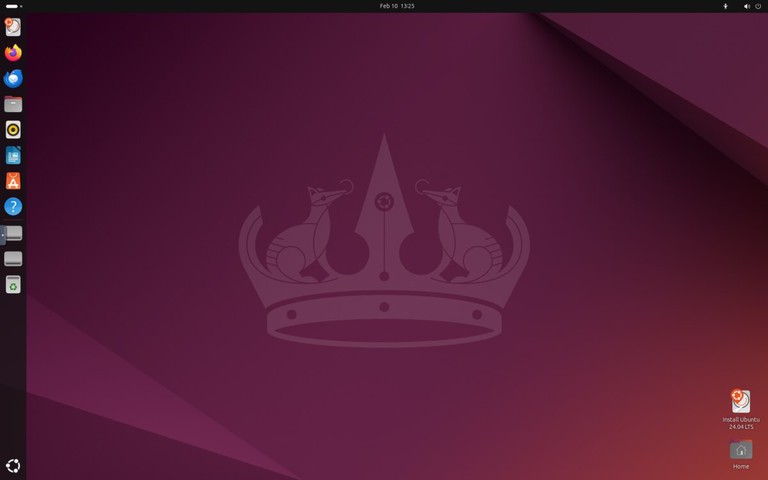
Ubuntu

Ubuntu is the most popular Linux distribution and an excellent starting point for newcomers. Developed by Canonical, it offers a polished desktop experience with the GNOME environment and extensive hardware support.

Ubuntu desktop screenshot

Ubuntu comes in several editions:

  • Ubuntu Desktop — Standard desktop with GNOME
  • Ubuntu Server — For server deployments
  • Kubuntu, Lubuntu, Xubuntu — Alternative desktop environments

Ubuntu releases new versions every six months, with Long Term Support (LTS) versions every two years receiving five years of security updates.

Website: https://ubuntu.com/

Linux Mint

Linux Mint is an excellent choice for users coming from Windows. Its Cinnamon desktop environment provides a familiar layout with a taskbar, start menu, and system tray.

Linux Mint desktop screenshot

Key features:

  • Comes with multimedia codecs preinstalled
  • LibreOffice productivity suite included
  • Update Manager for easy system maintenance
  • Available with Cinnamon, MATE, or Xfce desktops

Website: https://linuxmint.com/

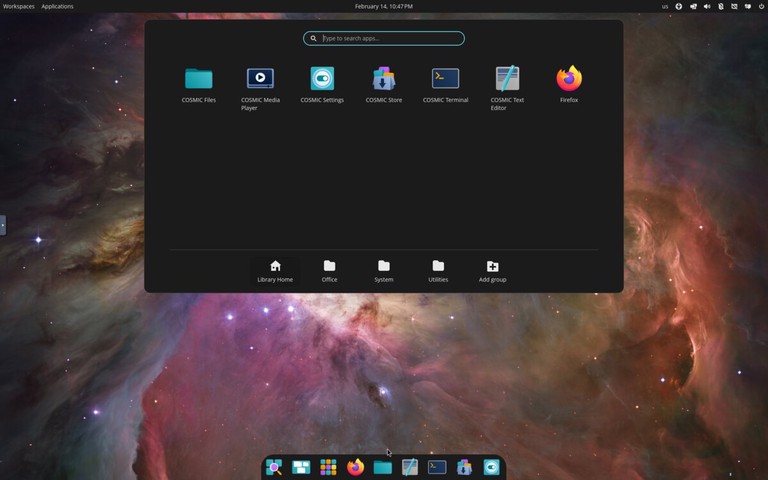
Pop!_OS

Developed by System76, Pop!_OS is based on Ubuntu but optimized for productivity and gaming. It ships with the COSMIC desktop environment (built in Rust by System76), featuring built-in window tiling, a launcher for quick app access, and excellent NVIDIA driver support out of the box.

Pop!_OS desktop screenshot

Pop!_OS is particularly popular among:

  • Gamers (thanks to Steam and Proton integration)
  • Developers (includes many development tools)
  • Users with NVIDIA graphics cards

Website: https://pop.system76.com/

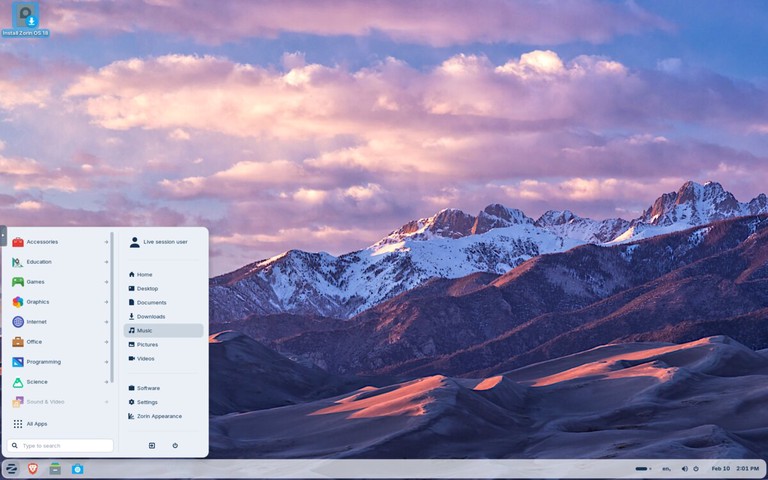
Zorin OS

Zorin OS is a beginner-focused distribution designed to make the move from Windows or macOS easier. It includes polished desktop layouts, strong hardware compatibility, and a simple settings experience for new users.

Zorin OS is a strong option when you want:

  • A familiar desktop layout with minimal setup
  • Stable Ubuntu-based package compatibility
  • Good out-of-the-box support for everyday desktop tasks
Zorin OS desktop screenshot

Website: https://zorin.com/os/

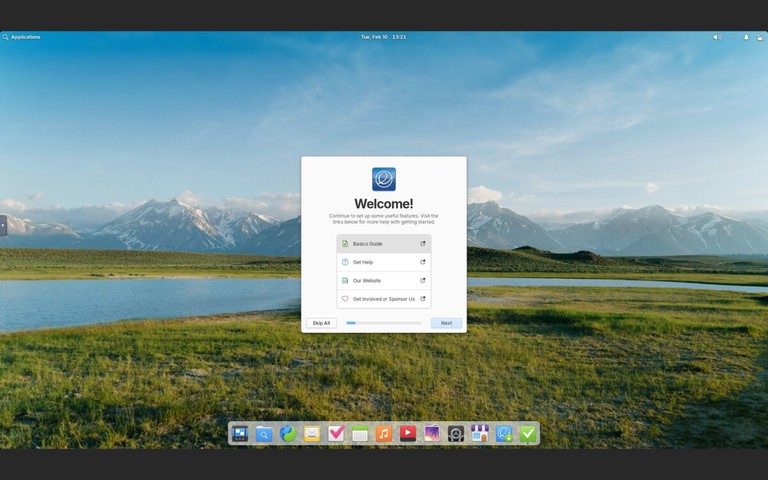
elementary OS

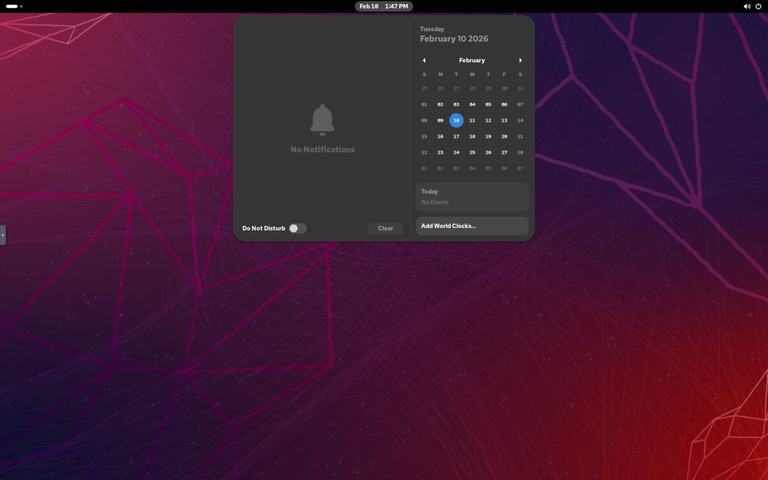
elementary OS is a design-focused distribution with a macOS-like interface called Pantheon. It emphasizes simplicity, consistency, and a curated app experience through its AppCenter.

elementary OS desktop screenshot

elementary OS is a good fit when you want:

  • A clean, visually polished desktop out of the box
  • A curated app store with native applications
  • A macOS-like workflow on Linux

Website: https://elementary.io/

Lightweight Linux Distros

These distributions are designed for older hardware or users who prefer a minimal, fast system.

Xubuntu

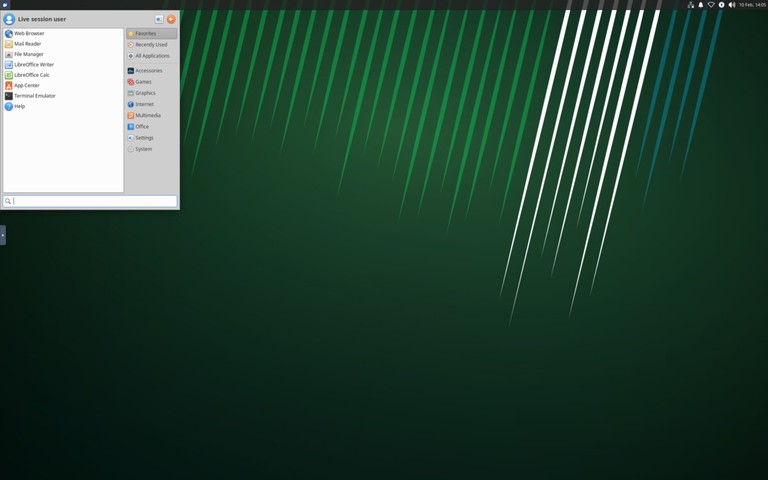
Xubuntu combines Ubuntu’s reliability with the Xfce desktop environment, offering a good balance between performance and features. It is lighter than standard Ubuntu while remaining full-featured for daily desktop use.

Xubuntu is a practical choice when you need:

  • Better performance on older hardware
  • A traditional desktop workflow
  • Ubuntu repositories and long-term support options
Xubuntu desktop screenshot

Website: https://xubuntu.org/

Lubuntu

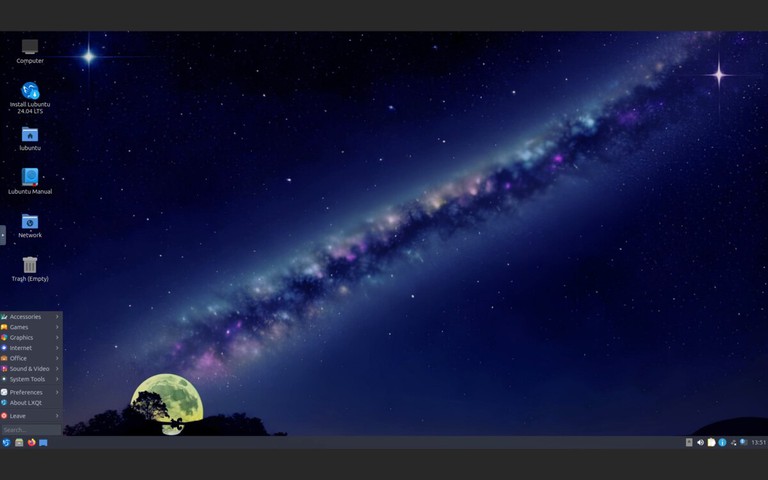
Lubuntu uses the LXQt desktop environment, making it one of the lightest Ubuntu-based distributions available. It is designed for very old or resource-constrained hardware where even Xfce feels heavy.

Lubuntu desktop screenshot

Lubuntu works well when you need:

  • Minimal memory and CPU usage
  • A functional desktop on very old hardware
  • Access to Ubuntu repositories and LTS support

Website: https://lubuntu.me/

Linux Distros for Advanced Users

These distributions offer more control and customization but require technical knowledge to set up and maintain.

Arch Linux

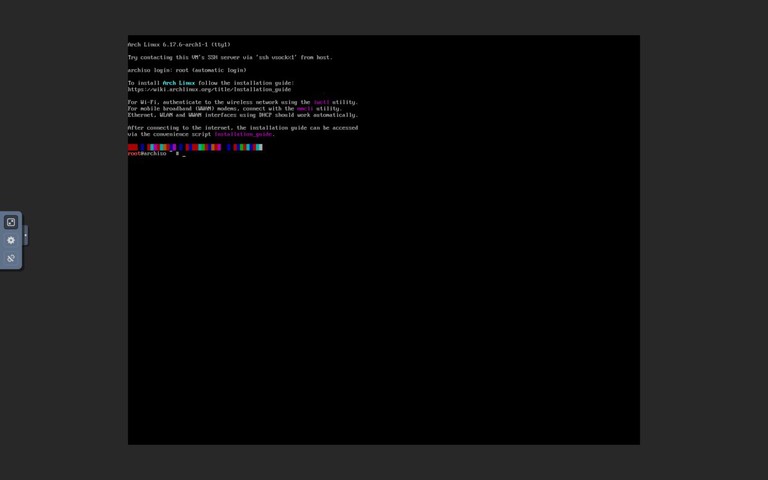
Arch Linux follows a “do-it-yourself” philosophy, providing a minimal base system that users build according to their needs. It uses a rolling release model, meaning you always have the latest software without major version upgrades.

Key features:

  • Pacman package manager with access to vast repositories
  • Arch User Repository (AUR) for community packages
  • Excellent documentation in the Arch Wiki
  • Complete control over every aspect of the system
Arch Linux desktop screenshot
Tip
Arch Linux requires manual installation via the command line. If you want the Arch experience with an easier setup, consider Manjaro or EndeavourOS.

Website: https://archlinux.org/

EndeavourOS

EndeavourOS is an Arch-based distribution that keeps the Arch philosophy while simplifying installation and initial setup. It is popular among users who want a near-Arch experience without doing a fully manual install.

EndeavourOS gives you:

  • Rolling release updates
  • Access to Arch repositories and AUR packages
  • A cleaner onboarding path than a base Arch install
EndeavourOS desktop screenshot

Website: https://endeavouros.com/

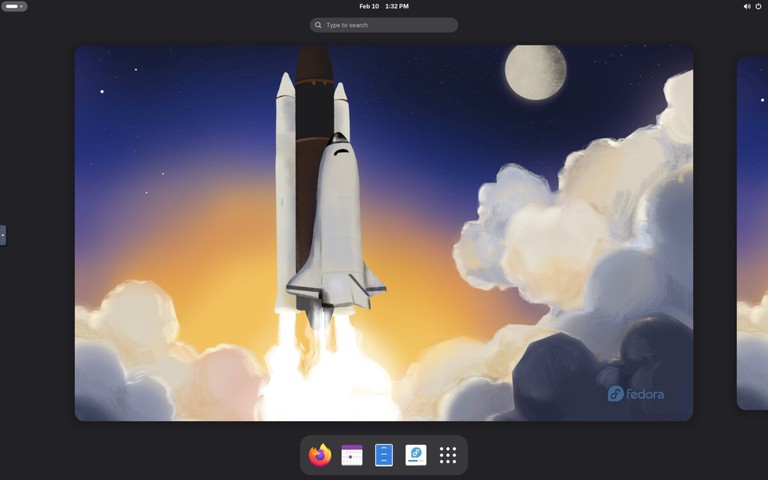
Fedora

Fedora is a cutting-edge distribution sponsored by Red Hat. It showcases the latest open-source technologies while maintaining stability, making it popular among developers and system administrators.

Fedora desktop screenshot

Fedora editions include:

  • Fedora Workstation — Desktop with GNOME
  • Fedora Server — For server deployments
  • Fedora Silverblue — Immutable desktop OS
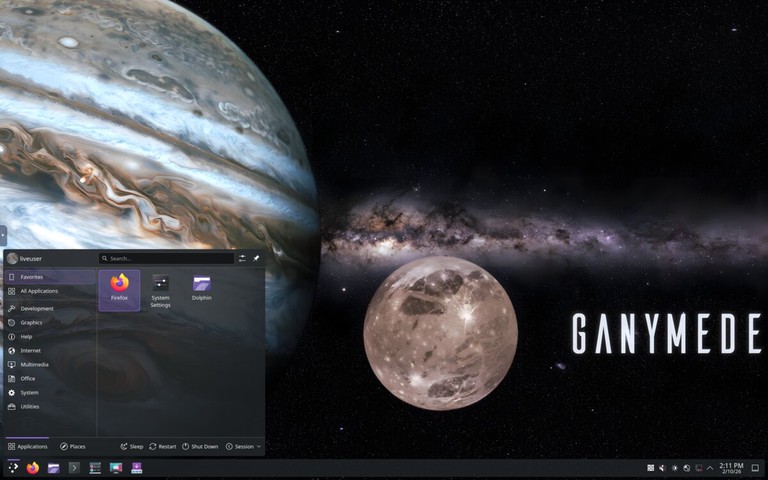
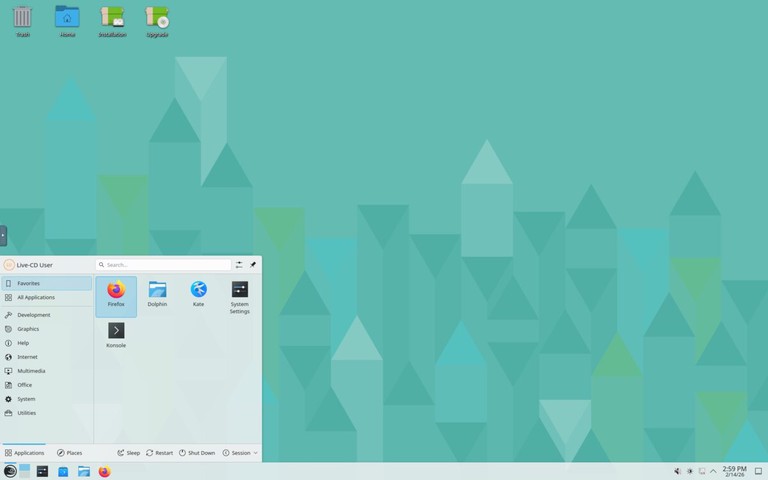
  • Fedora Spins — Alternative desktops (KDE, Xfce, etc.)

Many Red Hat technologies debut in Fedora before reaching RHEL, making it ideal for learning enterprise Linux.

Website: https://fedoraproject.org/

openSUSE

openSUSE is a community-driven distribution known for its stability and powerful administration tools. It offers two main variants:

  • openSUSE Leap — Regular releases based on SUSE Linux Enterprise
  • openSUSE Tumbleweed — Rolling release with the latest packages

The YaST (Yet another Setup Tool) configuration utility makes system administration straightforward, handling everything from software installation to network configuration.

openSUSE desktop screenshot

Website: https://www.opensuse.org/

Linux Distros for Gaming

Gaming-focused distributions prioritize current graphics stacks, controller support, and compatibility with modern Steam and Proton workflows.

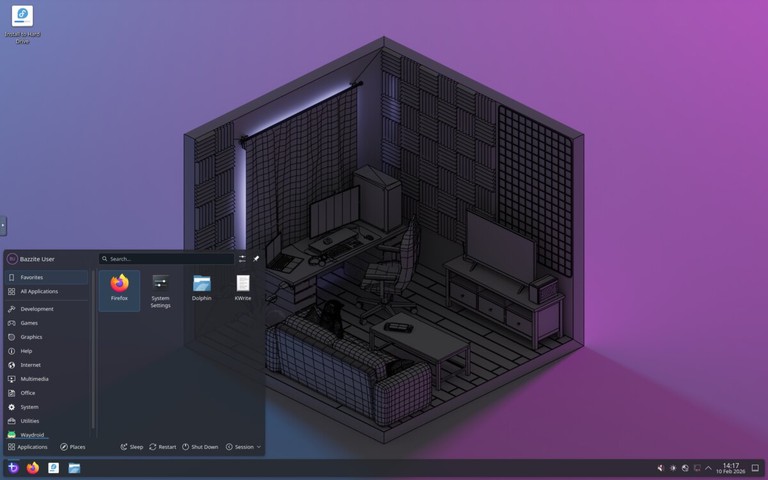
Bazzite

Bazzite is an immutable Fedora-based desktop optimized for gaming and handheld devices. It ships with gaming-focused defaults and integrates well with Steam, Proton, and modern GPU drivers.

Bazzite is ideal when you want:

  • A Steam-first gaming setup
  • Reliable rollback and update behavior from an immutable base
  • A distro tuned for gaming PCs and handheld hardware
Bazzite desktop screenshot

Website: https://bazzite.gg/

Linux Distros for Servers

These distributions are optimized for stability, security, and long-term support in server environments.

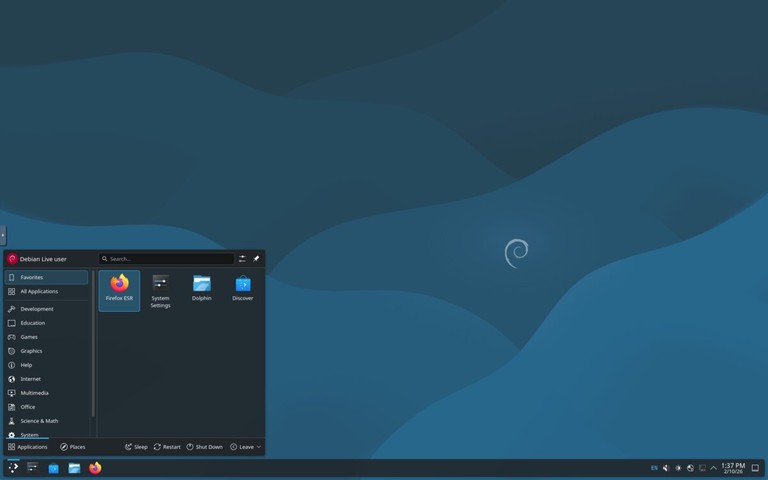
Debian

Debian is one of the oldest and most influential Linux distributions. Known for its rock-solid stability and rigorous testing process, it serves as the foundation for Ubuntu, Linux Mint, Kali Linux, and many other distributions.

Debian desktop screenshot

Debian offers three release channels:

  • Stable — Thoroughly tested, ideal for production servers
  • Testing — Upcoming stable release with newer packages
  • Unstable (Sid) — Rolling release with the latest software

With over 59,000 packages in its repositories, Debian supports more hardware architectures than any other Linux distribution.

Website: https://www.debian.org/

Red Hat Enterprise Linux (RHEL)

RHEL is the industry standard for enterprise Linux deployments. It offers:

  • 10-year support lifecycle
  • Certified hardware and software compatibility
  • Red Hat Insights for predictive analytics
  • Professional support from Red Hat

RHEL runs on multiple architectures including x86_64, ARM64, IBM Power, and IBM Z.

Website: https://www.redhat.com/

Rocky Linux

After CentOS shifted to CentOS Stream, Rocky Linux emerged as a community-driven RHEL-compatible distribution. Founded by one of the original CentOS creators, it provides 1:1 binary compatibility with RHEL.

Rocky Linux desktop screenshot

Rocky Linux is ideal for:

  • Organizations previously using CentOS
  • Production servers requiring stability
  • Anyone needing RHEL compatibility without the cost

Website: https://rockylinux.org/

Ubuntu Server

Ubuntu Server is widely used for cloud deployments and containerized workloads. It powers a significant portion of public cloud instances on AWS, Google Cloud, and Azure.

Features include:

  • Regular and LTS releases
  • Excellent container and Kubernetes support
  • Ubuntu Pro for extended security maintenance
  • Snap packages for easy application deployment

Website: https://ubuntu.com/server

SUSE Linux Enterprise Server (SLES)

SUSE Linux Enterprise Server is designed for mission-critical workloads. It excels in:

  • SAP HANA deployments
  • High-performance computing
  • Mainframe environments
  • Edge computing

SLES offers a common codebase across different environments, simplifying workload migration.

Website: https://www.suse.com/products/server/

Linux Distros for Security and Privacy

These distributions focus on security testing, anonymity, and privacy protection.

Kali Linux

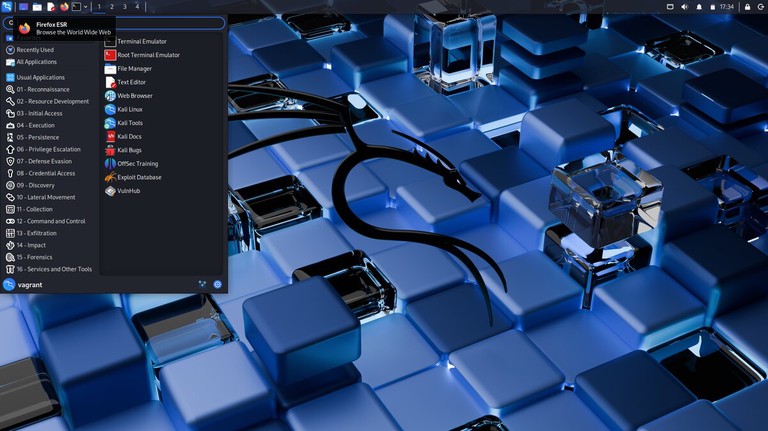
Kali Linux is the industry-standard platform for penetration testing and security research. Maintained by Offensive Security, it includes hundreds of security tools preinstalled.

Common use cases:

  • Penetration testing
  • Security auditing
  • Digital forensics
  • Reverse engineering
Kali Linux desktop screenshot
Warning
Kali Linux is designed for security professionals. It should not be used as a daily driver operating system.

Website: https://www.kali.org/

Tails

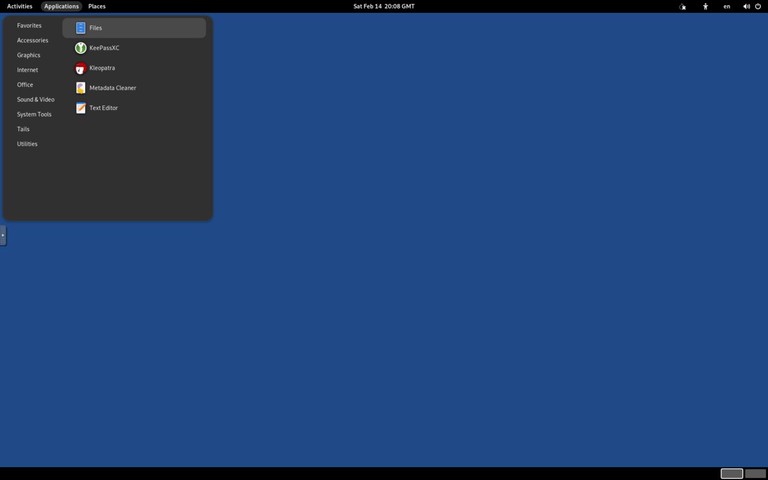
Tails (The Amnesic Incognito Live System) is a portable operating system designed for privacy and anonymity. It runs from a USB drive and routes all traffic through the Tor network.

Key features:

  • Leaves no trace on the host computer
  • All connections go through Tor
  • Built-in encryption tools
  • Amnesic by design (forgets everything on shutdown)
Tails desktop screenshot

Website: https://tails.net/

Qubes OS

Qubes OS takes a unique approach to security by isolating different activities in separate virtual machines called “qubes.” If one qube is compromised, others remain protected.

The Xen hypervisor runs directly on hardware, providing strong isolation between:

  • Work applications
  • Personal browsing
  • Untrusted software
  • Sensitive data

Website: https://www.qubes-os.org/

Parrot Security OS

Parrot Security is a Debian-based distribution for security testing, development, and privacy. It is lighter than Kali Linux and can serve as a daily driver.

Parrot offers several editions:

  • Security Edition — Full security toolkit
  • Home Edition — Privacy-focused daily use
  • Cloud Edition — For cloud deployments

Website: https://parrotsec.org/

Getting Started

Once you have chosen a distro, the next steps are:

  1. Download the ISO from the official website
  2. Create a bootable USB drive — See our guide on creating a bootable Linux USB
  3. Try it live before installing (most distros support this)
  4. Install following the distro’s installation wizard

Quick Comparison

Distro Best For Desktop Package Manager Based On
Ubuntu Beginners GNOME APT Debian
Linux Mint Windows users Cinnamon APT Ubuntu
Zorin OS New Linux users GNOME (Zorin desktop) APT Ubuntu
elementary OS macOS-like experience Pantheon APT Ubuntu
Fedora Developers GNOME DNF Independent
Debian Stability/Servers GNOME APT Independent
Arch Linux Advanced users Any Pacman Independent
EndeavourOS Arch with easier setup Xfce (default) Pacman Arch Linux
Pop!_OS Gaming/Developers COSMIC APT Ubuntu
Bazzite Gaming KDE/GNOME variants RPM-OSTree Fedora
Rocky Linux Enterprise servers None DNF RHEL
Xubuntu Older hardware Xfce APT Ubuntu
Lubuntu Very old hardware LXQt APT Ubuntu
Kali Linux Security testing Xfce APT Debian

FAQ

Which Linux distro is best for beginners?
Ubuntu, Linux Mint, and Zorin OS are the best choices for beginners. Ubuntu has the largest community and most documentation, while Linux Mint and Zorin OS provide a familiar desktop experience.

Can I try a Linux distro without installing it?
Yes. Most distributions support “live booting” from a USB drive, allowing you to test the system without making any changes to your computer.

Is Linux free?
Most Linux distributions are completely free to download and use. Some enterprise distros like RHEL offer paid support subscriptions.

Can I run Windows software on Linux?
Many Windows applications run on Linux through Wine or Proton (for games via Steam). Native alternatives like LibreOffice, GIMP, and Firefox are also available.

What is a rolling release distro?
A rolling release distro (like Arch Linux or openSUSE Tumbleweed) delivers continuous updates instead of major version upgrades. You always have the latest software, but updates require more attention.

Conclusion

The best Linux distribution depends entirely on your needs and experience level. If you are new to Linux, start with Ubuntu, Linux Mint, or Zorin OS. If you want full control over your system, try Arch Linux, EndeavourOS, or Fedora. For gaming, Pop!_OS and Bazzite are strong options. For servers, Debian, Rocky Linux, Ubuntu Server, and RHEL are all solid choices. For security testing, Kali Linux and Parrot Security are the industry standards.

Most distributions are free to download and try. Create a bootable USB, test a few options, and find the one that fits your workflow.

If you have any questions, feel free to leave a comment below.

SCP Cheatsheet

Basic Syntax

Use this general form for scp commands.

Command Description
scp SOURCE DEST General scp syntax
scp file.txt user@host:/path/ Copy local file to remote
scp user@host:/path/file.txt . Copy remote file to current directory
scp user@host:/path/file.txt /local/path/ Copy remote file to local directory

Upload Files

Copy local files to a remote host.

Command Description
scp file.txt user@host:/tmp/ Upload one file
scp file1 file2 user@host:/tmp/ Upload multiple files
scp *.log user@host:/var/log/archive/ Upload matching files
scp -p file.txt user@host:/tmp/ Preserve modification times and mode

Download Files

Copy files from a remote host to your local system.

Command Description
scp user@host:/tmp/file.txt . Download to current directory
scp user@host:/tmp/file.txt ~/Downloads/ Download to specific directory
scp user@host:'/var/log/*.log' . Download remote wildcard (quoted)
scp user@host:/tmp/file.txt ./new-name.txt Download and rename locally

Copy Directories

Use -r for recursive directory transfers.

Command Description
scp -r dir/ user@host:/tmp/ Upload directory recursively
scp -r user@host:/var/www/ ./backup/ Download directory recursively
scp -r dir1 dir2 user@host:/tmp/ Upload multiple directories
scp -rp project/ user@host:/srv/ Recursive copy and preserve attributes

Ports, Keys, and Identity

Connect with custom SSH settings.

Command Description
scp -P 2222 file.txt user@host:/tmp/ Use custom SSH port
scp -i ~/.ssh/id_ed25519 file.txt user@host:/tmp/ Use specific private key
scp -o IdentityFile=~/.ssh/id_ed25519 file.txt user@host:/tmp/ Set key with -o option
scp -o StrictHostKeyChecking=yes file.txt user@host:/tmp/ Enforce host key verification

Performance and Reliability

Tune speed, verbosity, and resilience.

Command Description
scp -C large-file.iso user@host:/tmp/ Enable compression
scp -l 8000 file.txt user@host:/tmp/ Limit bandwidth (Kbit/s)
scp -v file.txt user@host:/tmp/ Verbose output for debugging
scp -q file.txt user@host:/tmp/ Quiet mode
scp -o ConnectTimeout=10 file.txt user@host:/tmp/ Set connection timeout

Remote to Remote Copy

Transfer files between two remote hosts.

Command Description
scp user1@host1:/path/file user2@host2:/path/ Copy between remote hosts
scp -3 user1@host1:/path/file user2@host2:/path/ Route transfer through local host
scp -P 2222 user1@host1:/path/file user2@host2:/path/ Use custom port (applies to both hosts)

Common Patterns

Frequently used command combinations.

Command Description
scp -r ./site user@host:/var/www/ Deploy static site files
scp -i ~/.ssh/id_ed25519 -P 2222 backup.sql user@host:/tmp/ Upload with key and custom port
scp user@host:/etc/nginx/nginx.conf ./ Pull config for review
scp -rp ./configs user@host:/etc/myapp/ Copy configs and keep metadata

Troubleshooting

Check Command
Permission denied Verify user has write access to the destination path
Host key verification failed ssh-keygen -R hostname to remove old key, then retry
Connection refused on custom port scp -P PORT file user@host:/path/ (uppercase -P)
Transfer stalls or times out scp -o ConnectTimeout=10 -o ServerAliveInterval=15 file user@host:/path/
Not a regular file error Add -r for directories: scp -r dir/ user@host:/path/
Protocol error on OpenSSH 9.0+ scp -O file user@host:/path/ to use legacy SCP protocol
Debug connection issues scp -v file user@host:/path/ for verbose SSH output

Related Guides

Use these articles for detailed file transfer and SSH workflows.

Guide Description
How to Use SCP Command to Securely Transfer Files Full scp guide with practical examples
SSH Command in Linux SSH options, authentication, and connection examples
How to Use Linux SFTP Command to Transfer Files Interactive secure file transfer over SSH
How to Use Rsync for Local and Remote Data Transfer Incremental sync and directory transfer
❌